The collaboration between Skyvern and Novita AI marks a significant advancement in AI-powered automation and development capabilities. By combining Skyvern’s expertise in browser-based workflow automation with Novita AI’s robust GPU infrastructure and model deployment platform, developers and businesses can now access a comprehensive solution for building and scaling AI applications. Our comprehensive guide will walk you through Novita AI implementation on Skyvern, including setting up Docker Compose and leveraging Novita AI in Skyvern.Documentation Index
Fetch the complete documentation index at: https://novita.ai/docs/llms.txt
Use this file to discover all available pages before exploring further.
Setting Up Docker Compose
Step 1: Ensure Docker Desktop is installed and running on your machine. Step 2: Check for running PostgreSQL instances usingdocker ps the command.
Step 3: Navigate to the project directory after cloning the repository.
http://localhost:8080 in your browser to start using the UI.
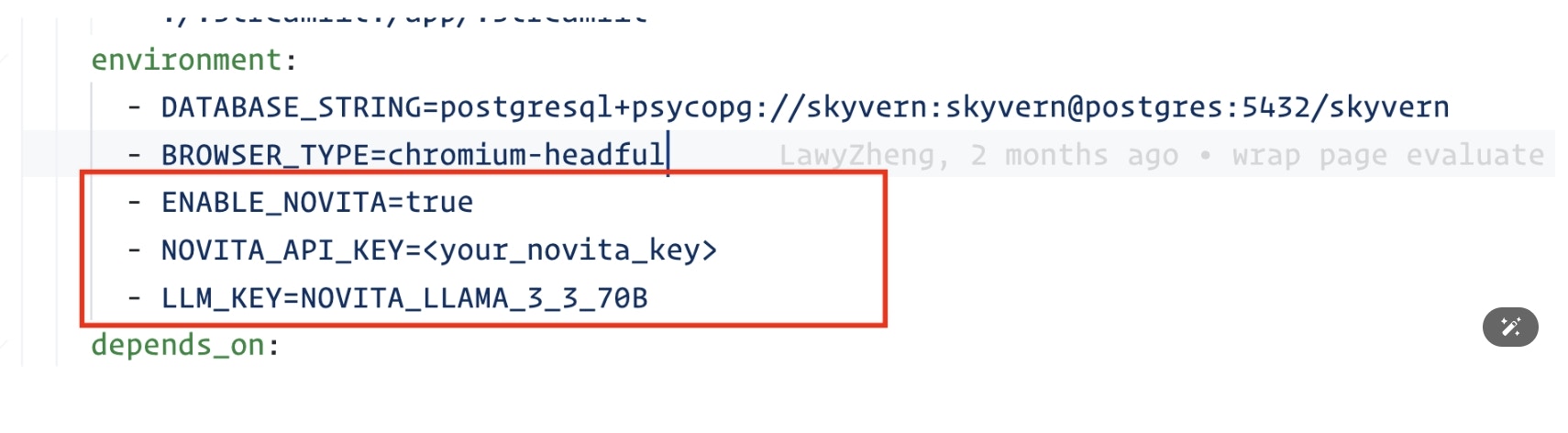
Leveraging Novita AI in Skyvern
Step 1: Update environment variables in docker-compose.yml before building the docker image. Step 2: Start Novita AI LLM service by runningdocker compose up -d.