

What’s New
The latest release adds Telegram and Slack as messaging channels with CLI-based configuration, and improves install reliability:- Telegram Channel (CLI) — Polling and Webhook modes for connecting your agent to Telegram
- Slack Channel — Socket and HTTP modes for connecting your agent to Slack
- Install Script Improvements — Install directory changed to
~/.novitaclaw-cli, improvedupdatecommand with PEP 668 support and symlink recovery
Previous Release
- Web Terminal — Browser-based terminal access to your sandbox, no SSH required
- File Manager — Browse and manage workspace files directly from the browser
- systemd Service Management — Gateway, Web Terminal, and File Manager are fully managed by systemd with automatic restart on failure, replacing the previous nohup-based background processes
- Crash Auto-Recovery — When the Gateway crashes repeatedly, it automatically runs diagnostics, repairs configuration, and restores service without manual intervention
- Config Auto-Backup — Every config write creates an automatic backup; crash recovery can restore from the latest known-good backup
Getting Started
Prerequisites
- Python installed
- A Novita API key (create/manage keys in Key Management)
How to install Python
How to install Python
WindowsDownload the Python installer and run it. Check “Add Python to PATH” before clicking Install Now — skipping this is the most common reason beginners hit errors later.macOSOpen Terminal and run:If you see Python 3.10 or higher, you’re good. If Terminal prompts you to install Command Line Developer Tools, click Install and wait a few minutes.Linux (Ubuntu / Debian)
Bash
Bash
Step 1: Install NovitaClaw
novitaclaw --help. If you see a list of commands, you’re all set.
Step 2: Set your API key
Step 3: Launch your instance
Bash
- Web UI URL — Chat with your agent
- Gateway WebSocket URL & Token — For programmatic access
- Web Terminal URL — Terminal access to the sandbox in your browser
- File Manager URL — Browse and manage workspace files
- Login credentials — Username and password for Web Terminal & File Manager

Chat tab to start using your agent.
Web Terminal
The Web Terminal provides browser-based terminal access to your sandbox environment. Open the Web Terminal URL returned by the launch command and log in with the provided credentials. This gives you a full shell session — install packages, inspect logs, or debug your agent directly.File Manager
The File Manager lets you browse, upload, download, and manage files in the sandbox workspace through a web interface. Open the File Manager URL and log in with the same credentials. Use it to view agent workspace files, edit configurations, or transfer files without needing CLI access.For existing sandboxes launched before these services were available, you can add them retroactively:
Bash
Configuring Models
Your instance is pre-configured with a Novita-hosted model out of the box. To change the models your agent uses, navigate toSettings → Config, click Raw to switch to Raw JSON5 view, then click the reveal button next to “secrets redacted” to show the full config.
Update the following two sections:
Step 1: Register the model under your provider
Add a new object to themodels array inside models.providers.novita:
Step 2: Set it as primary or fallback
Update themodel field under agents.defaults to reference your model using the provider/model-id format:
Connecting Channels
OpenClaw supports external messaging channels so your agent is reachable outside the Web UI. Channels are disabled by default and must be configured.Telegram
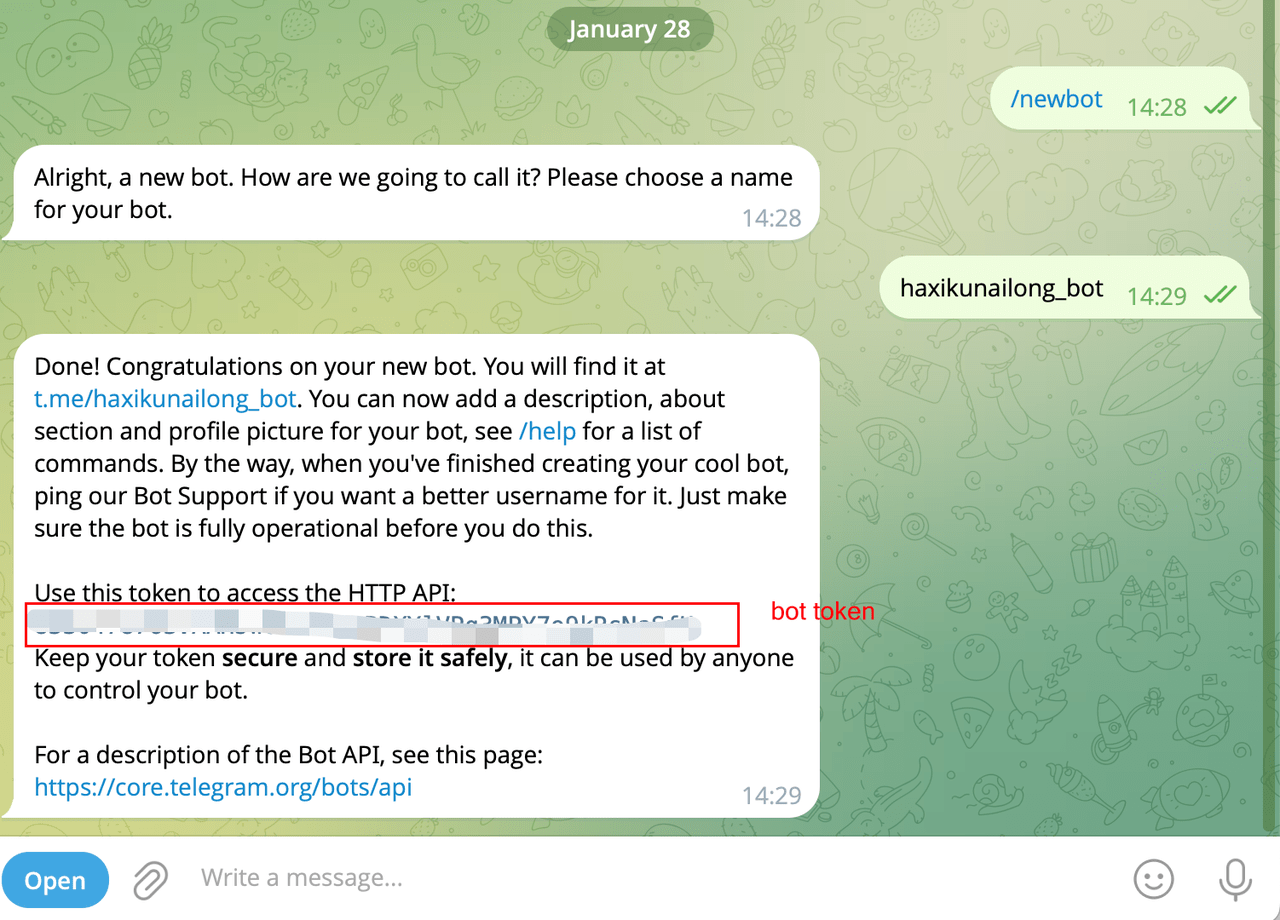
Connect your agent to Telegram as a messaging channel. Two connection modes are supported: Polling (default, long-poll — no public URL needed) and Webhook (HTTP push — best for on-demand sandboxes). Step 1: Create a Telegram Bot- Open Telegram and find @BotFather.
- Send
/newbotand follow the prompts to name your bot. - Copy the bot token BotFather provides.
Bash
/start. The bot replies with a pairing code. Approve it via CLI:
Bash
Slack
Connect your agent to Slack as a messaging channel. Two connection modes are supported: Socket (default, WebSocket — no public URL needed) and HTTP (Events API webhook — best for on-demand sandboxes).Bash
Bash
Service Reliability
All core services in the sandbox are managed by systemd for production-grade reliability:
Crash auto-recovery: If the Gateway crashes repeatedly, the system automatically runs diagnostics, attempts repair, and restores the last known-good configuration from backup — no manual intervention required.
Config auto-backup: Every configuration write creates an automatic backup. If a bad config causes a crash, the recovery process restores from the most recent valid backup.
Command Reference
launch
Create a new sandbox instance.
Bash
list
List active sandbox instances.
Bash
status
Check a sandbox instance status. Displays webhook URLs for all configured channels.
Bash
stop
Terminate a sandbox instance.
Bash
tui
Connect to a sandbox via terminal UI.
Bash
doctor
Run diagnostics and repair checks on a sandbox instance.
Bash
gateway update
Update OpenClaw to the latest version inside a sandbox.
Bash
gateway restart
Restart the OpenClaw Gateway in a sandbox.
Bash
services setup
Install and start Web Terminal and File Manager on an existing sandbox. Use this to add services to older sandboxes that were launched before these services were included.
Bash
pair list
List pending pairing requests for a channel.
Bash
pair approve
Approve a pairing request for a channel.
Bash
pair telegram
Configure Telegram as a messaging channel.
Bash
pair slack
Configure Slack as a messaging channel.
Bash
update
Check for CLI updates and upgrade to the latest version.
Bash
Programmatic Usage
Use JSON output for automation:Bash
Environment Variables
Pricing
Troubleshooting
Command not found
Try one of these:Bash
Connection timeout
Increase launch timeout:Bash