> ## Documentation Index
> Fetch the complete documentation index at: https://novita.ai/docs/llms.txt
> Use this file to discover all available pages before exploring further.
# Portkey
> Stroomlijn AI-ontwikkeling door Portkey AI Gateway met Novita AI te gebruiken voor snelle, veilige en betrouwbare prestaties.
Portkey AI Gateway transformeert de manier waarop ontwikkelaars werken met AI-modellen zoals Novita AI, door een uniforme interface te bieden voor naadloze toegang tot meerdere taalmodellen met snelle, veilige en betrouwbare routering. Deze integratie vereenvoudigt AI-ontwikkeling en verbetert de prestaties van applicaties.
Deze gids leidt je door het instellen van Portkey AI Gateway en vervolgens het integreren van de Novita AI API met Portkey.
## Portkey AI Gateway instellen
Het instellen van Portkey AI Gateway is eenvoudig en efficiënt en vereist slechts drie belangrijke stappen: de gateway configureren, je eerste verzoek verzenden en routering en guardrails optimaliseren voor naadloze prestaties.
### Stap 1: Stel je AI Gateway in
Om de gateway lokaal uit te voeren, zorg je ervoor dat Node.js en npm op je systeem zijn geïnstalleerd. Zodra alles gereed is, voer je de volgende opdracht uit:
```jason theme={"system"}
npx @portkey-ai/gateway
```
Nadat de gateway is gestart, worden twee belangrijke URL's weergegeven:
* De Gateway: `http://localhost:8787/v1`
* De Gateway Console: `http://localhost:8787/public/`
### Stap 2: Doe je eerste verzoek
Begin met het installeren van de Portkey AI Python-library:
```python theme={"system"}
pip install -qU portkey-ai
```
Voer vervolgens de volgende Python-code uit om je eerste verzoek te verzenden:
```python theme={"system"}
from portkey_ai import Portkey
# OpenAI compatible client
client = Portkey(
provider="openai", # or 'anthropic', 'bedrock', 'groq', etc
Authorization="sk-***" # the provider API key
)
# Make a request through your AI Gateway
client.chat.completions.create(
messages=[{"role": "user", "content": "What's the weather like?"}],
model="gpt-4o-mini"
)
```
Monitor moeiteloos al je lokale logs op één centrale locatie met de Gateway Console op: `http://localhost:8787/public/`.
### Stap 3: Routering en guardrails
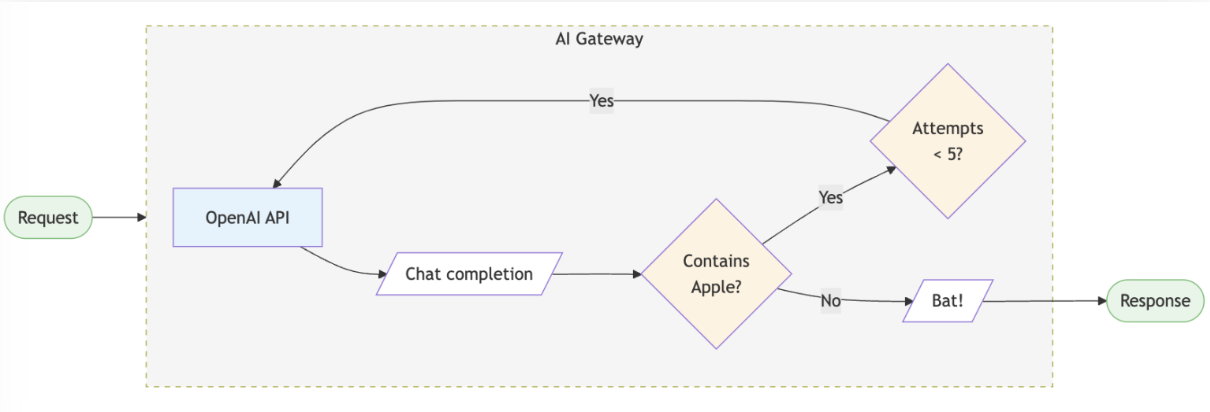
Portkey AI Gateway stelt je in staat routeringsregels te configureren, betrouwbaarheidsfuncties toe te voegen en guardrails af te dwingen. Hieronder staat een voorbeeldconfiguratie:
```python theme={"system"}
config = {
"retry": {"attempts": 5},
"output_guardrails": [{
"default.contains": {"operator": "none", "words": ["Apple"]},
"deny": True
}]
}
# Attach the config to the client
client = client.with_options(config=config)
client.chat.completions.create(
model="gpt-4o-mini",
messages=[{"role": "user", "content": "Reply randomly with Apple or Bat"}]
)
# In this example, the guardrail denies all replies containing "Apple", so the response would always be "Bat". The retry configuration would attempt the request up to 5 times before giving up.
```
 ## De Novita AI API integreren met Portkey
Volg deze stappen om via de Portkey AI Gateway toegang te krijgen tot de Novita AI API:
### Stap 1: Installeer de Portkey SDK
Integreer de Portkey SDK in je applicatie om via Portkey’s gateway naadloos te communiceren met de API van Novita AI.
**Node.JS**
```jason theme={"system"}
npm install --save portkey-ai
```
**Python**
```python theme={"system"}
pip install portkey-ai
```
### Stap 2: Initialiseer Portkey met de Virtual Key
Om Novita AI met Portkey te integreren, haal je je LLM API-sleutel op via[ Novita AI ](https://novita.ai/settings/key-management)en voeg je deze toe aan Portkey om de virtual key te genereren.
**Node.JS SDK**
```jason theme={"system"}
import Portkey from 'portkey-ai'
const portkey = new Portkey({
apiKey: "PORTKEY_API_KEY", // Replace with your Portkey API key
virtualKey: "VIRTUAL_KEY" // Replace with your virtual key for Novita AI
})
```
**Python SDK**
```python theme={"system"}
from portkey_ai import Portkey
portkey = Portkey(
api_key="PORTKEY_API_KEY", # Replace with your Portkey API key
virtual_key="VIRTUAL_KEY" # Replace with your virtual key for Novita AI
)
```
### Stap 3: Roep Chat Completions aan met Novita AI
Gebruik de Portkey-instantie om verzoeken naar Novita AI te verzenden. Indien nodig kun je de virtual key rechtstreeks binnen de API-aanroep overschrijven.
**Node.JS SDK**
```jason theme={"system"}
const chatCompletion = await portkey.chat.completions.create({
messages: [{ role: 'user', content: 'Say this is a test' }],
model: 'Nous-Hermes-2-Mixtral-8x7B-DPO'
});
console.log(chatCompletion.choices);
```
**Python SDK**
```python theme={"system"}
completion = portkey.chat.completions.create(
messages= [{ "role": 'user', "content": 'Say this is a test' }],
model= 'reka-core'
)
print(completion)
```
## De Novita AI API integreren met Portkey
Volg deze stappen om via de Portkey AI Gateway toegang te krijgen tot de Novita AI API:
### Stap 1: Installeer de Portkey SDK
Integreer de Portkey SDK in je applicatie om via Portkey’s gateway naadloos te communiceren met de API van Novita AI.
**Node.JS**
```jason theme={"system"}
npm install --save portkey-ai
```
**Python**
```python theme={"system"}
pip install portkey-ai
```
### Stap 2: Initialiseer Portkey met de Virtual Key
Om Novita AI met Portkey te integreren, haal je je LLM API-sleutel op via[ Novita AI ](https://novita.ai/settings/key-management)en voeg je deze toe aan Portkey om de virtual key te genereren.
**Node.JS SDK**
```jason theme={"system"}
import Portkey from 'portkey-ai'
const portkey = new Portkey({
apiKey: "PORTKEY_API_KEY", // Replace with your Portkey API key
virtualKey: "VIRTUAL_KEY" // Replace with your virtual key for Novita AI
})
```
**Python SDK**
```python theme={"system"}
from portkey_ai import Portkey
portkey = Portkey(
api_key="PORTKEY_API_KEY", # Replace with your Portkey API key
virtual_key="VIRTUAL_KEY" # Replace with your virtual key for Novita AI
)
```
### Stap 3: Roep Chat Completions aan met Novita AI
Gebruik de Portkey-instantie om verzoeken naar Novita AI te verzenden. Indien nodig kun je de virtual key rechtstreeks binnen de API-aanroep overschrijven.
**Node.JS SDK**
```jason theme={"system"}
const chatCompletion = await portkey.chat.completions.create({
messages: [{ role: 'user', content: 'Say this is a test' }],
model: 'Nous-Hermes-2-Mixtral-8x7B-DPO'
});
console.log(chatCompletion.choices);
```
**Python SDK**
```python theme={"system"}
completion = portkey.chat.completions.create(
messages= [{ "role": 'user', "content": 'Say this is a test' }],
model= 'reka-core'
)
print(completion)
```