> ## Documentation Index
> Fetch the complete documentation index at: https://novita.ai/docs/llms.txt
> Use this file to discover all available pages before exploring further.
# DeepSeek-OCR の使用方法
## 概要
DeepSeek-OCR は、ドキュメント認識および画像からテキストへの変換シナリオ向けに設計されており、視覚情報とテキスト情報の圧縮の限界を押し広げます。このモデルは長いテキストを高度に圧縮された画像としてレンダリングでき、10 倍の可逆圧縮率で 97% の OCR 精度、20 倍圧縮で約 60% の精度を達成します。
このモデルは現在、単一ターンの独立した認識タスクのみをサポートしています。マルチターン会話には対応していません。リクエストごとにアップロードできる画像は 1 枚のみであり、最適なパフォーマンスを得るためにプリセットプロンプトの使用を強く推奨します。
## 推奨プリセットプロンプト
```bash theme={"system"}
# Convert the document contents to markdown format
<|grounding|>Convert the document to markdown.
# Perform text recognition on this image
<|grounding|>OCR this image.
# Extract all text without layout consideration
Free OCR.
# Parse any figures or tables in the document
Parse the figure.
# Provide a detailed description of the image content
Describe this image in detail.
# Locate the position of <|ref|>xxxx<|/ref|> in the image
Locate <|ref|>xxxx<|/ref|> in the image.
```
## 使用例
この例では、`<|grounding|>OCR this image.` プリセットプロンプトを使用して画像テキスト認識を実行します。
```python theme={"system"}
from openai import OpenAI
client = OpenAI(
base_url="https://api.novita.ai/openai",
api_key="",
)
response = client.chat.completions.create(
model="deepseek/deepseek-ocr",
messages=[
{
"role": "user",
"content": [
{
"type": "image_url",
"image_url": {
"url": "https://example.com/image.png"
}
},
{
"type": "text",
"text": "<|grounding|>OCR this image."
}
]
}
],
stream=False,
max_tokens=4096
)
content = response.choices[0].message.content
print(content)
```
入力画像の例:
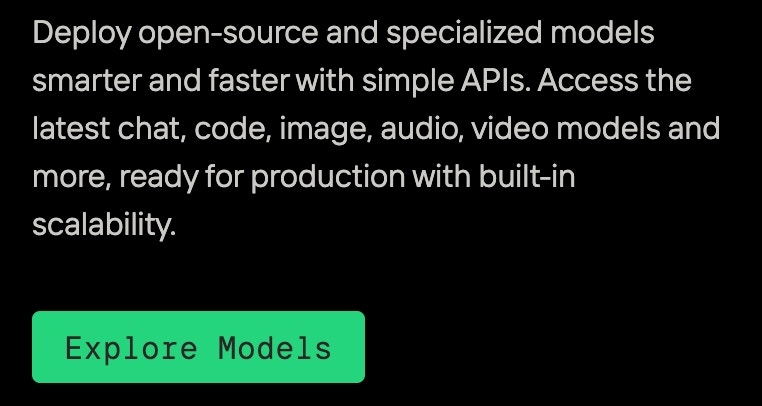 出力例:
```
<|/ref|><|det|>[[37, 48, 279, 140]]<|/det|>
<|ref|>Deploy open-source and specialized models<|/ref|><|det|>[[42, 48, 857, 133]]<|/det|>
<|ref|>smarterandfasterwithsimpleApls.Accessthe<|/ref|><|det|>[[44, 185, 902, 246]]<|/det|>
<|ref|>latest chat, code, image, audio, video models and<|/ref|><|det|>[[41, 291, 945, 370]]<|/det|>
<|ref|>more,ready for production with built-in<|/ref|><|det|>[[40, 407, 756, 488]]<|/det|>
<|ref|>scalability.<|/ref|><|det|>[[39, 515, 232, 606]]<|/det|>
<|ref|>Explore<|/ref|><|det|>[[87, 813, 266, 879]]<|/det|>
<|ref|>Models<|/ref|><|det|>[[289, 816, 432, 878]]<|/det|>
```
出力例:
```
<|/ref|><|det|>[[37, 48, 279, 140]]<|/det|>
<|ref|>Deploy open-source and specialized models<|/ref|><|det|>[[42, 48, 857, 133]]<|/det|>
<|ref|>smarterandfasterwithsimpleApls.Accessthe<|/ref|><|det|>[[44, 185, 902, 246]]<|/det|>
<|ref|>latest chat, code, image, audio, video models and<|/ref|><|det|>[[41, 291, 945, 370]]<|/det|>
<|ref|>more,ready for production with built-in<|/ref|><|det|>[[40, 407, 756, 488]]<|/det|>
<|ref|>scalability.<|/ref|><|det|>[[39, 515, 232, 606]]<|/det|>
<|ref|>Explore<|/ref|><|det|>[[87, 813, 266, 879]]<|/det|>
<|ref|>Models<|/ref|><|det|>[[289, 816, 432, 878]]<|/det|>
```