> ## Documentation Index
> Fetch the complete documentation index at: https://novita.ai/docs/llms.txt
> Use this file to discover all available pages before exploring further.
# Hugging Face
> Novita AI + Hugging Face による AI デプロイを効率化するためのシンプルなガイドです。
Novita AI と Hugging Face Platform の統合により、高度なサーバーレス推論機能を利用できます。最適化されたインフラストラクチャを通じて Hub のモデルページへ直接アクセスできるため、開発者はセットアップを簡素化できます。Hugging Face の JavaScript SDK と Python SDK を完全にサポートしているため、Novita AI はインフラストラクチャ管理なしでモデルのデプロイとスケーリングを簡単にします。
この包括的なガイドでは、Web インターフェースと SDK 統合の両方の方法を含め、Hugging Face 上で Novita AI を実装する手順を説明します。
## **Hugging Face の Web サイト UI で Novita AI を使用する**
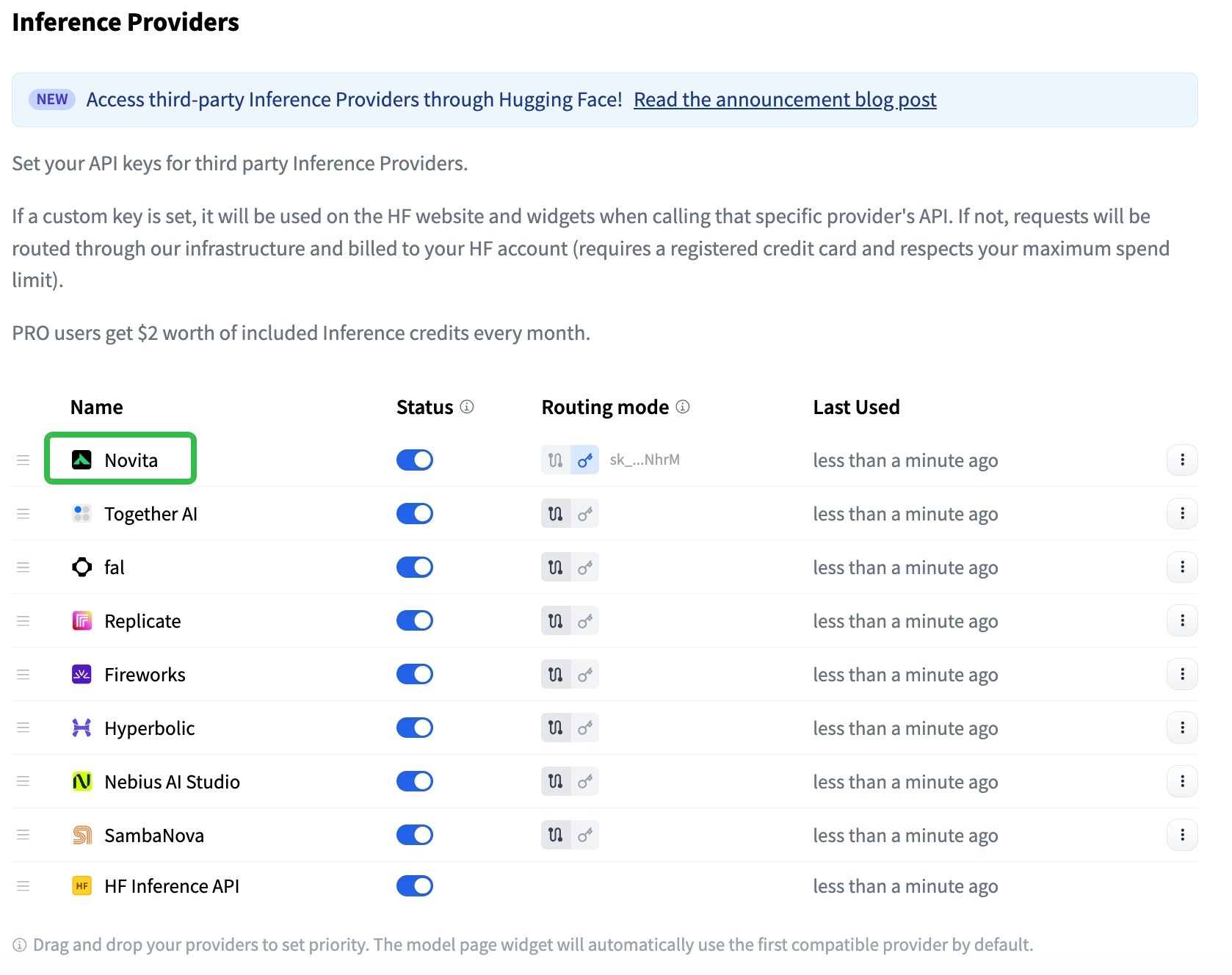
### **ステップ 1: API キーを設定する**
* アカウント設定ダッシュボードにアクセスして、API キーを設定します。
* Novita AI の認証情報を Hugging Face プラットフォームに入力します。
 ### **ステップ 2: Inference API のモードを選択する**
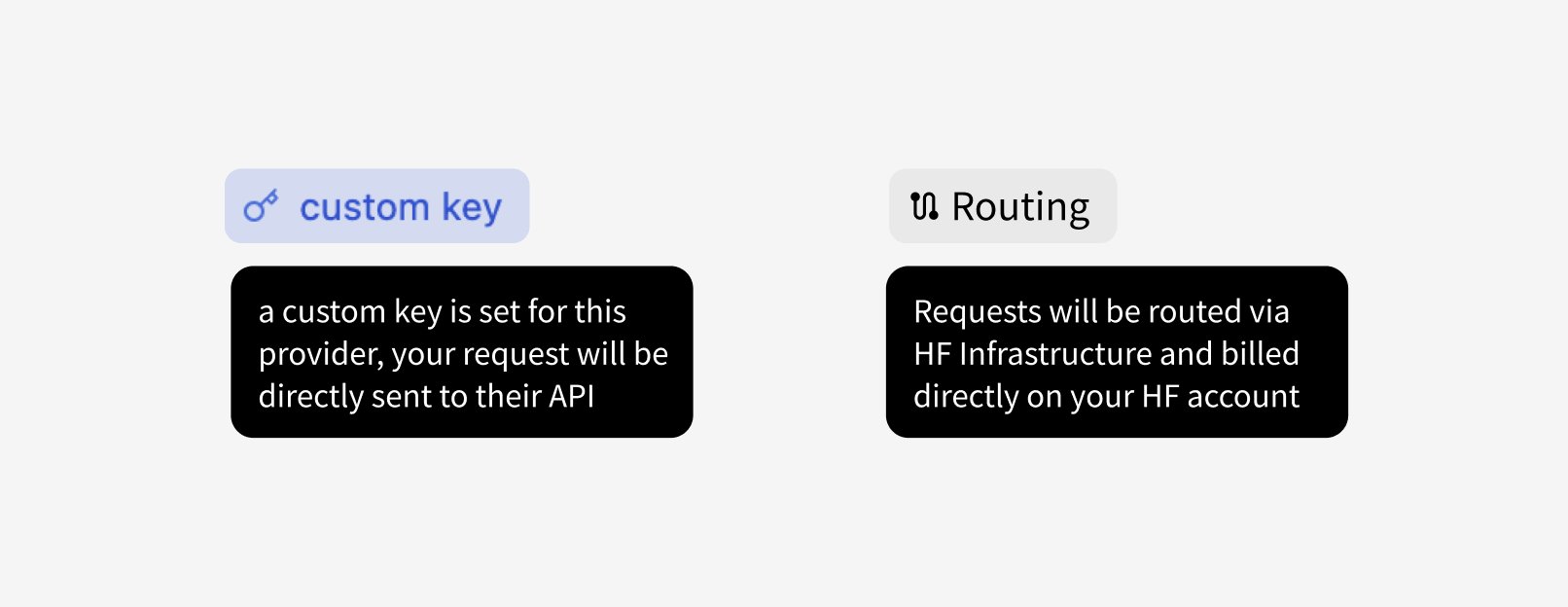
* Custom Key Mode: 呼び出しは推論プロバイダーに直接送信され、独自の API キーが使用されます。
* HF-Routed Mode: このモードでは、プロバイダートークンは不要です。料金はプロバイダーのアカウントではなく、Hugging Face アカウントに請求されます。
### **ステップ 2: Inference API のモードを選択する**
* Custom Key Mode: 呼び出しは推論プロバイダーに直接送信され、独自の API キーが使用されます。
* HF-Routed Mode: このモードでは、プロバイダートークンは不要です。料金はプロバイダーのアカウントではなく、Hugging Face アカウントに請求されます。
 ### **ステップ 3: モデルページで互換性のあるプロバイダーを確認する**
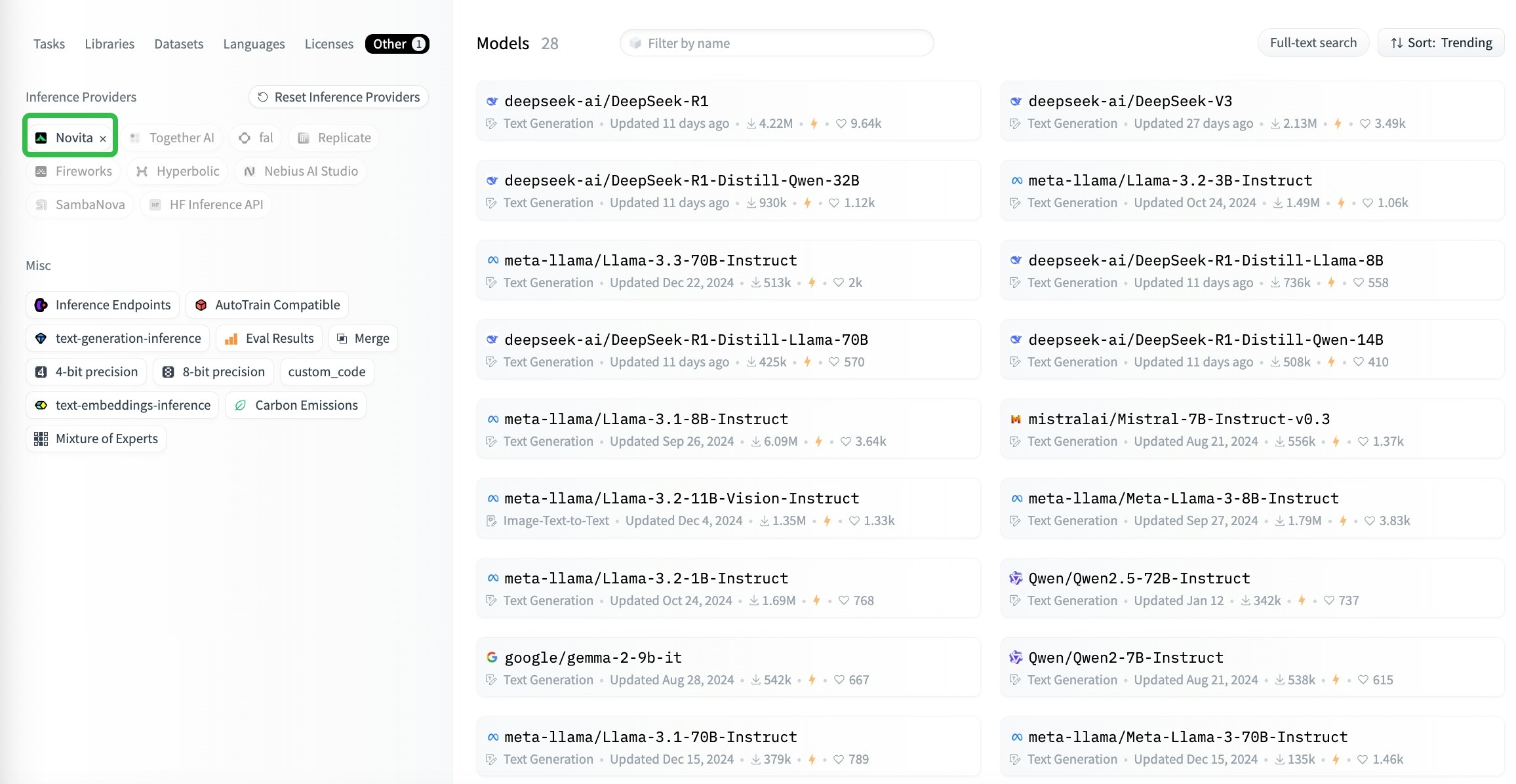
* モデルページには、選択したモデルと互換性のあるサードパーティの推論プロバイダーが表示されます(現在のモデルと互換性があるものが、ユーザー設定に基づいて並べ替えられます)。
### **ステップ 3: モデルページで互換性のあるプロバイダーを確認する**
* モデルページには、選択したモデルと互換性のあるサードパーティの推論プロバイダーが表示されます(現在のモデルと互換性があるものが、ユーザー設定に基づいて並べ替えられます)。
 ## **Client SDK を使用して Python から Huggingface\_hub を利用する**
### **ステップ 1: インストール** [**Huggingface\_hub**](https://github.com/huggingface/huggingface_hub)
```python theme={"system"}
pip install huggingface_hub
```
### **ステップ 2: Python でモデル API を呼び出す**
```python theme={"system"}
from huggingface_hub import InferenceClient
client = InferenceClient(
provider="novita",
api_key="xxxxxxxxxxxxxxxxxxxxxxxx", # optional, required from 2nd calling, get from https://novita.ai/settings/key-management
)
# an example question
messages = [
dict(
role="user",
content='Sally (a girl) has 3 brothers. Each brother has 2 sisters. How many sisters does Sally have?',
),
]
completion = client.chat.completions.create(
model="deepseek-ai/DeepSeek-R1",
messages=messages,
max_tokens=512,
)
print(completion.choices[0].message)
```
## **Client SDK を使用して JS から Huggingface\_hub を利用する**
```json theme={"system"}
import { HfInference } from "@huggingface/inference";
const client = new HfInference("xxxxxxxxxxxxxxxxxxxxxxxx");
const chatCompletion = await client.chatCompletion({
model: "deepseek-ai/DeepSeek-R1",
messages: [
{
role: "user",
content: "What is the capital of France?"
}
],
provider: "novita",
max_tokens: 500
});
console.log(chatCompletion.choices[0].message)
```
## **Client SDK を使用して Python から Huggingface\_hub を利用する**
### **ステップ 1: インストール** [**Huggingface\_hub**](https://github.com/huggingface/huggingface_hub)
```python theme={"system"}
pip install huggingface_hub
```
### **ステップ 2: Python でモデル API を呼び出す**
```python theme={"system"}
from huggingface_hub import InferenceClient
client = InferenceClient(
provider="novita",
api_key="xxxxxxxxxxxxxxxxxxxxxxxx", # optional, required from 2nd calling, get from https://novita.ai/settings/key-management
)
# an example question
messages = [
dict(
role="user",
content='Sally (a girl) has 3 brothers. Each brother has 2 sisters. How many sisters does Sally have?',
),
]
completion = client.chat.completions.create(
model="deepseek-ai/DeepSeek-R1",
messages=messages,
max_tokens=512,
)
print(completion.choices[0].message)
```
## **Client SDK を使用して JS から Huggingface\_hub を利用する**
```json theme={"system"}
import { HfInference } from "@huggingface/inference";
const client = new HfInference("xxxxxxxxxxxxxxxxxxxxxxxx");
const chatCompletion = await client.chatCompletion({
model: "deepseek-ai/DeepSeek-R1",
messages: [
{
role: "user",
content: "What is the capital of France?"
}
],
provider: "novita",
max_tokens: 500
});
console.log(chatCompletion.choices[0].message)
```