> ## Documentation Index
> Fetch the complete documentation index at: https://novita.ai/docs/llms.txt
> Use this file to discover all available pages before exploring further.
# Langfuse
> Guide étape par étape pour configurer Langfuse avec Novita AI afin de développer, surveiller, évaluer et déboguer des applications d’IA.
Avec Langfuse, votre équipe peut déboguer, analyser et itérer de manière collaborative sur ses applications LLM créées avec Novita AI. Ses fonctionnalités entièrement intégrées rationalisent le flux de travail de développement, améliorent l’efficacité et accélèrent les progrès.
Ce guide vous montre comment intégrer Novita AI à Langfuse. Les endpoints d’API de Novita AI pour le chat, le langage et le code sont entièrement compatibles avec l’API d’OpenAI. Cela nous permet d’utiliser le remplacement direct OpenAI de Langfuse pour tracer toutes les parties de votre application.
# Prérequis
Avant de commencer, assurez-vous de disposer des éléments suivants :
* Clé API Novita AI LLM :
* Visitez le site web de Novita AI pour créer un compte.
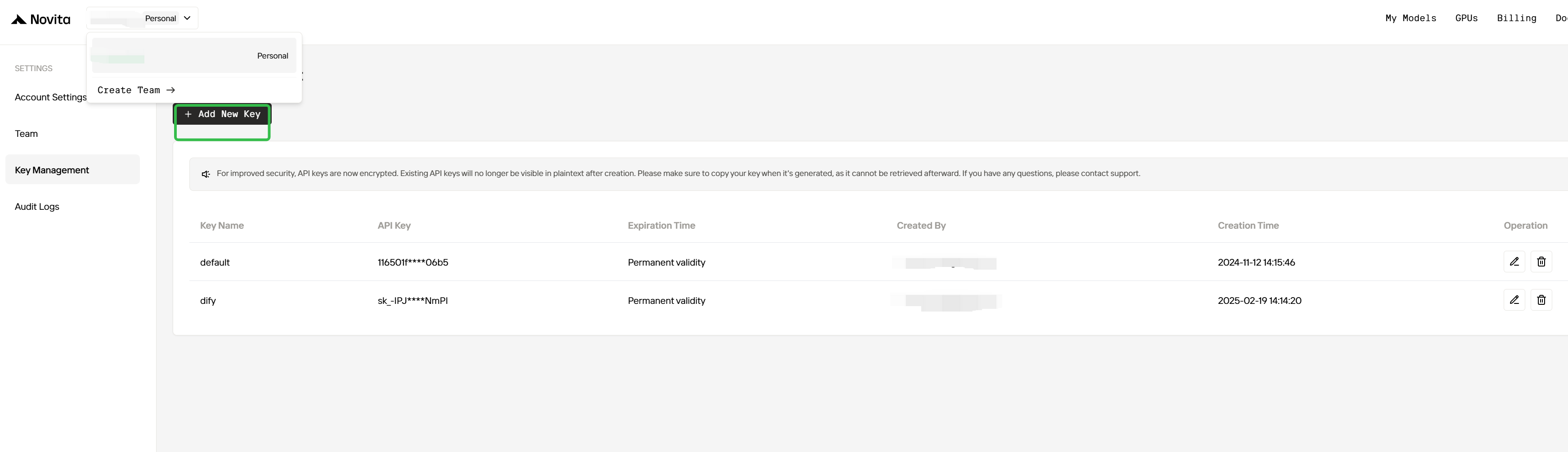
* Connectez-vous et accédez à la page Key Management pour générer votre clé API, qui est essentielle pour intégrer les modèles de Novita AI à Langfuse.
 * Compte Langfuse :
* Inscrivez-vous pour créer un compte Langfuse sur le site officiel [Langfuse](https://langfuse.com) afin de commencer à créer de puissantes applications d’IA.
# Étapes d’intégration
## Étape 1 : Installer les dépendances
Assurez-vous d’avoir installé tous les packages Python requis :
```shell theme={"system"}
pip install openai langfuse
```
## Étape 2 : Configurer les variables d’environnement
```python theme={"system"}
import os
# Get keys for your project from the project settings page
# https://cloud.langfuse.com
os.environ["LANGFUSE_PUBLIC_KEY"] = "pk-..." # DOCS EXAMPLE KEYS
os.environ["LANGFUSE_SECRET_KEY"] = "sk-..." # DOCS EXAMPLE KEYS
os.environ["LANGFUSE_HOST"] = "https://cloud.langfuse.com" # 🇪🇺 EU region
# os.environ["LANGFUSE_HOST"] = "https://us.cloud.langfuse.com" # 🇺🇸 US region
# Get your Novita AI API key from the project settings page
os.environ["NOVITA_API_KEY"] = "..."
```
## Étape 3 : Remplacement direct OpenAI de Langfuse
Dans cette étape, nous utilisons le [remplacement direct OpenAI](https://langfuse.com/docs/integrations/openai/python/get-started) natif en important `from langfuse.openai import openai`.
Pour commencer à utiliser Novita AI avec les bibliothèques clientes d’OpenAI, transmettez votre clé API Novita AI à l’option `api_key`, puis remplacez `base_url` par [`https://api.novita.ai/openai:`](https://api.novita.ai/openai)
```python theme={"system"}
# instead of import openai:
from langfuse.openai import openai
client = openai.OpenAI(
api_key=os.environ.get("NOVITA_API_KEY"),
base_url="https://api.novita.ai/openai",
)
```
**Remarque :** Le remplacement direct OpenAI est entièrement compatible avec le [Langfuse Python SDK](https://langfuse.com/docs/observability/sdk/overview) et l’[instrumentation `@observe()`](https://langfuse.com/docs/observability/sdk/instrumentation) pour tracer toutes les parties de votre application.
## Étape 4 : Exécuter un exemple
La cellule de code suivante montre comment utiliser le client OpenAI tracé pour appeler le modèle de chat de Novita AI. Tous les appels API seront tracés de manière transparente par Langfuse.
```python theme={"system"}
client = openai.OpenAI(
api_key=os.environ.get("NOVITA_API_KEY"),
base_url="https://api.novita.ai/openai",
)
response = client.chat.completions.create(
model="meta-llama/llama-3.1-70b-instruct",
messages=[
{"role": "system", "content": "Act like you are a helpful assistant."},
{"role": "user", "content": "What are the famous attractions in San Francisco?"},
]
)
print(response.choices[0].message.content)
San Francisco, one of the most iconic cities in the world, is home to a plethora of famous attractions that cater to all interests and ages. Here are some of the most popular attractions in San Francisco:
1. **Golden Gate Bridge**: An engineering marvel and a symbol of San Francisco, the Golden Gate Bridge is a must-visit attraction. Take a walk or bike ride across the bridge for spectacular views of the city and the Bay.
2. **Alcatraz Island**: Explore the infamous former prison turned national park, which once housed notorious inmates like Al Capone. Take a ferry to the island and enjoy a guided tour of the prison and its surroundings.
3. **Fisherman's Wharf**: A bustling waterfront district, Fisherman's Wharf is famous for its seafood restaurants, street performers, and stunning views of the Bay Bridge and Alcatraz Island. Don't miss the sea lions at Pier 39!
4. **Chinatown**: San Francisco's Chinatown is one of the largest and oldest in the United States. Explore the colorful streets, try some authentic Chinese cuisine, and shop for unique souvenirs.
5. **Golden Gate Park**: A sprawling urban park that's home to several attractions, including the de Young Museum, the California Academy of Sciences, and the Japanese Tea Garden.
6. **Cable Cars**: A classic San Francisco experience, the cable cars offer a fun and historic way to explore the city. Take a ride on the Powell-Mason line to Fisherman's Wharf, or the Powell-Hyde line to Lombard Street.
7. **Lombard Street**: Known as the "crookedest street in the world," Lombard Street is a scenic and winding road that offers stunning views of the city.
8. **Union Square**: A vibrant public square in the heart of the city, Union Square is surrounded by shopping, dining, and entertainment options. Catch a show at the historic Curran Theatre or take a stroll through the square.
9. **The Painted Ladies**: A row of colorful Victorian houses on Alamo Square, the Painted Ladies are a iconic symbol of San Francisco's architecture. Take a photo in front of these stunning homes.
10. **The Exploratorium**: A museum of science, art, and human perception, the Exploratorium is a great place to learn and have fun. With interactive exhibits and stunning views of the Bay, it's a must-visit for families and science enthusiasts.
11. **Pier 39**: A popular shopping and dining destination, Pier 39 offers stunning views of the Bay Bridge, Alcatraz Island, and the sea lions that call the pier home.
12. **The de Young Museum**: A fine arts museum located in Golden Gate Park, the de Young Museum features a diverse collection of art and cultural exhibitions from around the world.
These are just a few of the many famous attractions in San Francisco. Whether you're interested in history, culture, science, or entertainment, San Francisco has something for everyone.
```
## Étape 5 : Voir les traces dans Langfuse
Après avoir exécuté l’appel de modèle d’exemple, vous pouvez consulter les traces dans Langfuse. Ces traces fournissent des informations détaillées sur vos appels API Novita AI, notamment :
* Paramètres de requête (model, messages, temperature, etc.)
* Contenu de la réponse
* Statistiques d’utilisation des tokens
* Métriques de latence
[Lien public vers un exemple de trace dans Langfuse](https://cloud.langfuse.com/project/cm7ua5l6e05wlad07qr6ce2wn/traces/039cc8b2-dba0-479f-9cd6-63672bc08c71?timestamp=2025-03-06T02%3A15%3A15.184Z).
* Compte Langfuse :
* Inscrivez-vous pour créer un compte Langfuse sur le site officiel [Langfuse](https://langfuse.com) afin de commencer à créer de puissantes applications d’IA.
# Étapes d’intégration
## Étape 1 : Installer les dépendances
Assurez-vous d’avoir installé tous les packages Python requis :
```shell theme={"system"}
pip install openai langfuse
```
## Étape 2 : Configurer les variables d’environnement
```python theme={"system"}
import os
# Get keys for your project from the project settings page
# https://cloud.langfuse.com
os.environ["LANGFUSE_PUBLIC_KEY"] = "pk-..." # DOCS EXAMPLE KEYS
os.environ["LANGFUSE_SECRET_KEY"] = "sk-..." # DOCS EXAMPLE KEYS
os.environ["LANGFUSE_HOST"] = "https://cloud.langfuse.com" # 🇪🇺 EU region
# os.environ["LANGFUSE_HOST"] = "https://us.cloud.langfuse.com" # 🇺🇸 US region
# Get your Novita AI API key from the project settings page
os.environ["NOVITA_API_KEY"] = "..."
```
## Étape 3 : Remplacement direct OpenAI de Langfuse
Dans cette étape, nous utilisons le [remplacement direct OpenAI](https://langfuse.com/docs/integrations/openai/python/get-started) natif en important `from langfuse.openai import openai`.
Pour commencer à utiliser Novita AI avec les bibliothèques clientes d’OpenAI, transmettez votre clé API Novita AI à l’option `api_key`, puis remplacez `base_url` par [`https://api.novita.ai/openai:`](https://api.novita.ai/openai)
```python theme={"system"}
# instead of import openai:
from langfuse.openai import openai
client = openai.OpenAI(
api_key=os.environ.get("NOVITA_API_KEY"),
base_url="https://api.novita.ai/openai",
)
```
**Remarque :** Le remplacement direct OpenAI est entièrement compatible avec le [Langfuse Python SDK](https://langfuse.com/docs/observability/sdk/overview) et l’[instrumentation `@observe()`](https://langfuse.com/docs/observability/sdk/instrumentation) pour tracer toutes les parties de votre application.
## Étape 4 : Exécuter un exemple
La cellule de code suivante montre comment utiliser le client OpenAI tracé pour appeler le modèle de chat de Novita AI. Tous les appels API seront tracés de manière transparente par Langfuse.
```python theme={"system"}
client = openai.OpenAI(
api_key=os.environ.get("NOVITA_API_KEY"),
base_url="https://api.novita.ai/openai",
)
response = client.chat.completions.create(
model="meta-llama/llama-3.1-70b-instruct",
messages=[
{"role": "system", "content": "Act like you are a helpful assistant."},
{"role": "user", "content": "What are the famous attractions in San Francisco?"},
]
)
print(response.choices[0].message.content)
San Francisco, one of the most iconic cities in the world, is home to a plethora of famous attractions that cater to all interests and ages. Here are some of the most popular attractions in San Francisco:
1. **Golden Gate Bridge**: An engineering marvel and a symbol of San Francisco, the Golden Gate Bridge is a must-visit attraction. Take a walk or bike ride across the bridge for spectacular views of the city and the Bay.
2. **Alcatraz Island**: Explore the infamous former prison turned national park, which once housed notorious inmates like Al Capone. Take a ferry to the island and enjoy a guided tour of the prison and its surroundings.
3. **Fisherman's Wharf**: A bustling waterfront district, Fisherman's Wharf is famous for its seafood restaurants, street performers, and stunning views of the Bay Bridge and Alcatraz Island. Don't miss the sea lions at Pier 39!
4. **Chinatown**: San Francisco's Chinatown is one of the largest and oldest in the United States. Explore the colorful streets, try some authentic Chinese cuisine, and shop for unique souvenirs.
5. **Golden Gate Park**: A sprawling urban park that's home to several attractions, including the de Young Museum, the California Academy of Sciences, and the Japanese Tea Garden.
6. **Cable Cars**: A classic San Francisco experience, the cable cars offer a fun and historic way to explore the city. Take a ride on the Powell-Mason line to Fisherman's Wharf, or the Powell-Hyde line to Lombard Street.
7. **Lombard Street**: Known as the "crookedest street in the world," Lombard Street is a scenic and winding road that offers stunning views of the city.
8. **Union Square**: A vibrant public square in the heart of the city, Union Square is surrounded by shopping, dining, and entertainment options. Catch a show at the historic Curran Theatre or take a stroll through the square.
9. **The Painted Ladies**: A row of colorful Victorian houses on Alamo Square, the Painted Ladies are a iconic symbol of San Francisco's architecture. Take a photo in front of these stunning homes.
10. **The Exploratorium**: A museum of science, art, and human perception, the Exploratorium is a great place to learn and have fun. With interactive exhibits and stunning views of the Bay, it's a must-visit for families and science enthusiasts.
11. **Pier 39**: A popular shopping and dining destination, Pier 39 offers stunning views of the Bay Bridge, Alcatraz Island, and the sea lions that call the pier home.
12. **The de Young Museum**: A fine arts museum located in Golden Gate Park, the de Young Museum features a diverse collection of art and cultural exhibitions from around the world.
These are just a few of the many famous attractions in San Francisco. Whether you're interested in history, culture, science, or entertainment, San Francisco has something for everyone.
```
## Étape 5 : Voir les traces dans Langfuse
Après avoir exécuté l’appel de modèle d’exemple, vous pouvez consulter les traces dans Langfuse. Ces traces fournissent des informations détaillées sur vos appels API Novita AI, notamment :
* Paramètres de requête (model, messages, temperature, etc.)
* Contenu de la réponse
* Statistiques d’utilisation des tokens
* Métriques de latence
[Lien public vers un exemple de trace dans Langfuse](https://cloud.langfuse.com/project/cm7ua5l6e05wlad07qr6ce2wn/traces/039cc8b2-dba0-479f-9cd6-63672bc08c71?timestamp=2025-03-06T02%3A15%3A15.184Z).