> ## Documentation Index
> Fetch the complete documentation index at: https://novita.ai/docs/llms.txt
> Use this file to discover all available pages before exploring further.
# Portkey
> Optimiza el desarrollo de IA usando Portkey AI Gateway con Novita AI para obtener un rendimiento rápido, seguro y confiable.
Portkey AI Gateway transforma la forma en que los desarrolladores trabajan con modelos de IA como Novita AI, proporcionando una interfaz unificada para acceder sin problemas a múltiples modelos de lenguaje con enrutamiento rápido, seguro y confiable. Esta integración simplifica el desarrollo de IA y mejora el rendimiento de las aplicaciones.
Esta guía te mostrará cómo configurar Portkey AI Gateway y luego integrar la API de Novita AI con Portkey.
## Cómo configurar Portkey AI Gateway
Configurar Portkey AI Gateway es simple y eficiente, y requiere solo tres pasos clave: configurar el gateway, enviar tu primera solicitud y optimizar el enrutamiento y las barreras de protección para un rendimiento fluido.
### Paso 1: Configura tu AI Gateway
Para ejecutar el gateway localmente, asegúrate de que Node.js y npm estén instalados en tu sistema. Cuando esté listo, ejecuta el siguiente comando:
```jason theme={"system"}
npx @portkey-ai/gateway
```
Después de que el gateway se inicie, se mostrarán dos URL clave:
* El Gateway: `http://localhost:8787/v1`
* La Consola del Gateway: `http://localhost:8787/public/`
### Paso 2: Realiza tu primera solicitud
Comienza instalando la biblioteca de Python de Portkey AI:
```python theme={"system"}
pip install -qU portkey-ai
```
A continuación, ejecuta el siguiente código de Python para enviar tu primera solicitud:
```python theme={"system"}
from portkey_ai import Portkey
# OpenAI compatible client
client = Portkey(
provider="openai", # or 'anthropic', 'bedrock', 'groq', etc
Authorization="sk-***" # the provider API key
)
# Make a request through your AI Gateway
client.chat.completions.create(
messages=[{"role": "user", "content": "What's the weather like?"}],
model="gpt-4o-mini"
)
```
Supervisa fácilmente todos tus registros locales en una ubicación centralizada usando la Consola del Gateway en: `http://localhost:8787/public/`.
### Paso 3: Enrutamiento y barreras de protección
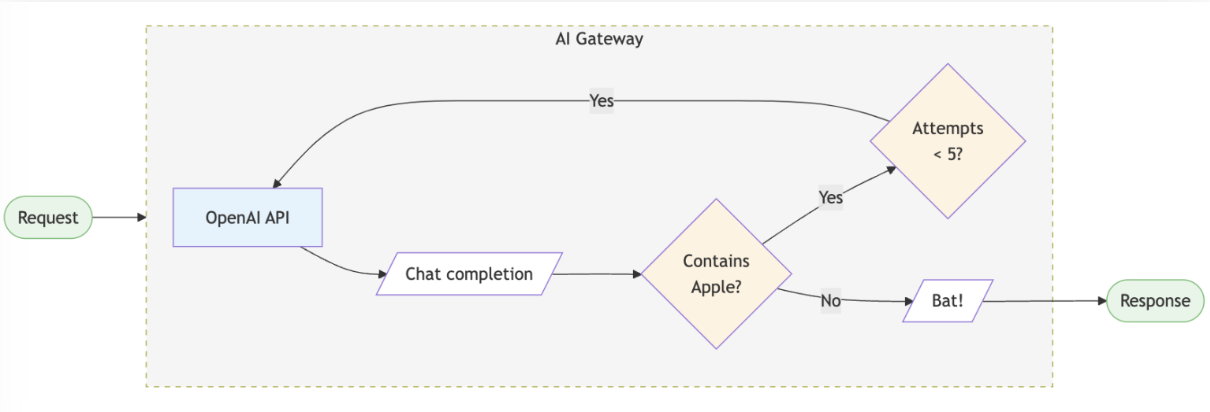
Portkey AI Gateway te permite configurar reglas de enrutamiento, añadir funciones de confiabilidad y aplicar barreras de protección. A continuación se muestra una configuración de ejemplo:
```python theme={"system"}
config = {
"retry": {"attempts": 5},
"output_guardrails": [{
"default.contains": {"operator": "none", "words": ["Apple"]},
"deny": True
}]
}
# Attach the config to the client
client = client.with_options(config=config)
client.chat.completions.create(
model="gpt-4o-mini",
messages=[{"role": "user", "content": "Reply randomly with Apple or Bat"}]
)
# In this example, the guardrail denies all replies containing "Apple", so the response would always be "Bat". The retry configuration would attempt the request up to 5 times before giving up.
```
 ## Cómo integrar la API de Novita AI con Portkey
Para acceder a la API de Novita AI a través de Portkey AI Gateway, sigue estos pasos:
### Paso 1: Instala el SDK de Portkey
Integra el SDK de Portkey en tu aplicación para interactuar sin problemas con la API de Novita AI a través del gateway de Portkey.
**Node.JS**
```jason theme={"system"}
npm install --save portkey-ai
```
**Python**
```python theme={"system"}
pip install portkey-ai
```
### Paso 2: Inicializa Portkey con la clave virtual
Para integrar Novita AI con Portkey, recupera tu clave de API de LLM desde [ Novita AI ](https://novita.ai/settings/key-management) y añádela a Portkey para generar la clave virtual.
**SDK de Node.JS**
```jason theme={"system"}
import Portkey from 'portkey-ai'
const portkey = new Portkey({
apiKey: "PORTKEY_API_KEY", // Replace with your Portkey API key
virtualKey: "VIRTUAL_KEY" // Replace with your virtual key for Novita AI
})
```
**SDK de Python**
```python theme={"system"}
from portkey_ai import Portkey
portkey = Portkey(
api_key="PORTKEY_API_KEY", # Replace with your Portkey API key
virtual_key="VIRTUAL_KEY" # Replace with your virtual key for Novita AI
)
```
### Paso 3: Invoca las finalizaciones de chat con Novita AI
Utiliza la instancia de Portkey para enviar solicitudes a Novita AI. Si es necesario, puedes sobrescribir la clave virtual directamente dentro de la llamada a la API.
**SDK de Node.JS**
```jason theme={"system"}
const chatCompletion = await portkey.chat.completions.create({
messages: [{ role: 'user', content: 'Say this is a test' }],
model: 'Nous-Hermes-2-Mixtral-8x7B-DPO'
});
console.log(chatCompletion.choices);
```
**SDK de Python**
```python theme={"system"}
completion = portkey.chat.completions.create(
messages= [{ "role": 'user', "content": 'Say this is a test' }],
model= 'reka-core'
)
print(completion)
```
## Cómo integrar la API de Novita AI con Portkey
Para acceder a la API de Novita AI a través de Portkey AI Gateway, sigue estos pasos:
### Paso 1: Instala el SDK de Portkey
Integra el SDK de Portkey en tu aplicación para interactuar sin problemas con la API de Novita AI a través del gateway de Portkey.
**Node.JS**
```jason theme={"system"}
npm install --save portkey-ai
```
**Python**
```python theme={"system"}
pip install portkey-ai
```
### Paso 2: Inicializa Portkey con la clave virtual
Para integrar Novita AI con Portkey, recupera tu clave de API de LLM desde [ Novita AI ](https://novita.ai/settings/key-management) y añádela a Portkey para generar la clave virtual.
**SDK de Node.JS**
```jason theme={"system"}
import Portkey from 'portkey-ai'
const portkey = new Portkey({
apiKey: "PORTKEY_API_KEY", // Replace with your Portkey API key
virtualKey: "VIRTUAL_KEY" // Replace with your virtual key for Novita AI
})
```
**SDK de Python**
```python theme={"system"}
from portkey_ai import Portkey
portkey = Portkey(
api_key="PORTKEY_API_KEY", # Replace with your Portkey API key
virtual_key="VIRTUAL_KEY" # Replace with your virtual key for Novita AI
)
```
### Paso 3: Invoca las finalizaciones de chat con Novita AI
Utiliza la instancia de Portkey para enviar solicitudes a Novita AI. Si es necesario, puedes sobrescribir la clave virtual directamente dentro de la llamada a la API.
**SDK de Node.JS**
```jason theme={"system"}
const chatCompletion = await portkey.chat.completions.create({
messages: [{ role: 'user', content: 'Say this is a test' }],
model: 'Nous-Hermes-2-Mixtral-8x7B-DPO'
});
console.log(chatCompletion.choices);
```
**SDK de Python**
```python theme={"system"}
completion = portkey.chat.completions.create(
messages= [{ "role": 'user', "content": 'Say this is a test' }],
model= 'reka-core'
)
print(completion)
```