> ## Documentation Index
> Fetch the complete documentation index at: https://novita.ai/docs/llms.txt
> Use this file to discover all available pages before exploring further.
# Langfuse
> Guía paso a paso para configurar Langfuse con Novita AI para desarrollar, supervisar, evaluar y depurar aplicaciones de IA.
Con Langfuse, tu equipo puede depurar, analizar e iterar de forma colaborativa en sus aplicaciones LLM creadas con Novita AI. Sus funciones totalmente integradas optimizan el flujo de trabajo de desarrollo, mejoran la eficiencia y aceleran el progreso.
Esta guía te muestra cómo integrar Novita AI con Langfuse. Los endpoints de API de Novita AI para chat, lenguaje y código son totalmente compatibles con la API de OpenAI. Esto nos permite usar el sustituto directo de OpenAI de Langfuse para rastrear todas las partes de tu aplicación.
# Requisitos previos
Antes de comenzar, asegúrate de tener lo siguiente:
* Clave de API LLM de Novita AI:
* Visita el sitio web de Novita AI para crear una cuenta.
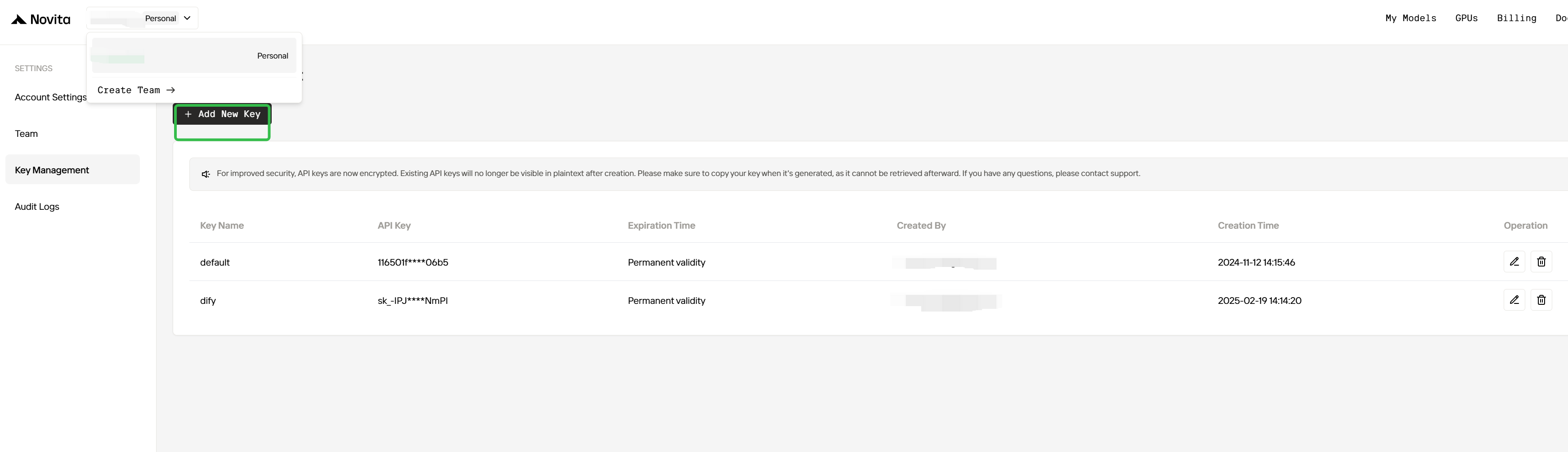
* Inicia sesión y ve a la página de gestión de claves para generar tu clave de API, que es esencial para integrar los modelos de Novita AI con Langfuse.
 * Cuenta de Langfuse:
* Regístrate para obtener una cuenta de Langfuse en el sitio web oficial de [Langfuse](https://langfuse.com) para empezar a crear potentes aplicaciones de IA.
# Pasos de integración
## Paso 1: Instalar dependencias
Asegúrate de haber instalado todos los paquetes de Python requeridos:
```shell theme={"system"}
pip install openai langfuse
```
## Paso 2: Configurar variables de entorno
```python theme={"system"}
import os
# Get keys for your project from the project settings page
# https://cloud.langfuse.com
os.environ["LANGFUSE_PUBLIC_KEY"] = "pk-..." # DOCS EXAMPLE KEYS
os.environ["LANGFUSE_SECRET_KEY"] = "sk-..." # DOCS EXAMPLE KEYS
os.environ["LANGFUSE_HOST"] = "https://cloud.langfuse.com" # 🇪🇺 EU region
# os.environ["LANGFUSE_HOST"] = "https://us.cloud.langfuse.com" # 🇺🇸 US region
# Get your Novita AI API key from the project settings page
os.environ["NOVITA_API_KEY"] = "..."
```
## Paso 3: Sustituto directo de OpenAI de Langfuse
En este paso usamos el [sustituto directo de OpenAI](https://langfuse.com/docs/integrations/openai/python/get-started) nativo importando `from langfuse.openai import openai`.
Para empezar a usar Novita AI con las bibliotecas de cliente de OpenAI, pasa tu clave de API de Novita AI a la opción `api_key` y cambia `base_url` a [`https://api.novita.ai/openai:`](https://api.novita.ai/openai)
```python theme={"system"}
# instead of import openai:
from langfuse.openai import openai
client = openai.OpenAI(
api_key=os.environ.get("NOVITA_API_KEY"),
base_url="https://api.novita.ai/openai",
)
```
**Nota:** El sustituto directo de OpenAI es totalmente compatible con el [Langfuse Python SDK](https://langfuse.com/docs/observability/sdk/overview) y la [instrumentación de `@observe()`](https://langfuse.com/docs/observability/sdk/instrumentation) para rastrear todas las partes de tu aplicación.
## Paso 4: Ejecutar un ejemplo
La siguiente celda de código muestra cómo usar el cliente de OpenAI rastreado para llamar al modelo de chat de Novita AI. Langfuse rastreará sin problemas todas las llamadas a la API.
```python theme={"system"}
client = openai.OpenAI(
api_key=os.environ.get("NOVITA_API_KEY"),
base_url="https://api.novita.ai/openai",
)
response = client.chat.completions.create(
model="meta-llama/llama-3.1-70b-instruct",
messages=[
{"role": "system", "content": "Act like you are a helpful assistant."},
{"role": "user", "content": "What are the famous attractions in San Francisco?"},
]
)
print(response.choices[0].message.content)
San Francisco, one of the most iconic cities in the world, is home to a plethora of famous attractions that cater to all interests and ages. Here are some of the most popular attractions in San Francisco:
1. **Golden Gate Bridge**: An engineering marvel and a symbol of San Francisco, the Golden Gate Bridge is a must-visit attraction. Take a walk or bike ride across the bridge for spectacular views of the city and the Bay.
2. **Alcatraz Island**: Explore the infamous former prison turned national park, which once housed notorious inmates like Al Capone. Take a ferry to the island and enjoy a guided tour of the prison and its surroundings.
3. **Fisherman's Wharf**: A bustling waterfront district, Fisherman's Wharf is famous for its seafood restaurants, street performers, and stunning views of the Bay Bridge and Alcatraz Island. Don't miss the sea lions at Pier 39!
4. **Chinatown**: San Francisco's Chinatown is one of the largest and oldest in the United States. Explore the colorful streets, try some authentic Chinese cuisine, and shop for unique souvenirs.
5. **Golden Gate Park**: A sprawling urban park that's home to several attractions, including the de Young Museum, the California Academy of Sciences, and the Japanese Tea Garden.
6. **Cable Cars**: A classic San Francisco experience, the cable cars offer a fun and historic way to explore the city. Take a ride on the Powell-Mason line to Fisherman's Wharf, or the Powell-Hyde line to Lombard Street.
7. **Lombard Street**: Known as the "crookedest street in the world," Lombard Street is a scenic and winding road that offers stunning views of the city.
8. **Union Square**: A vibrant public square in the heart of the city, Union Square is surrounded by shopping, dining, and entertainment options. Catch a show at the historic Curran Theatre or take a stroll through the square.
9. **The Painted Ladies**: A row of colorful Victorian houses on Alamo Square, the Painted Ladies are a iconic symbol of San Francisco's architecture. Take a photo in front of these stunning homes.
10. **The Exploratorium**: A museum of science, art, and human perception, the Exploratorium is a great place to learn and have fun. With interactive exhibits and stunning views of the Bay, it's a must-visit for families and science enthusiasts.
11. **Pier 39**: A popular shopping and dining destination, Pier 39 offers stunning views of the Bay Bridge, Alcatraz Island, and the sea lions that call the pier home.
12. **The de Young Museum**: A fine arts museum located in Golden Gate Park, the de Young Museum features a diverse collection of art and cultural exhibitions from around the world.
These are just a few of the many famous attractions in San Francisco. Whether you're interested in history, culture, science, or entertainment, San Francisco has something for everyone.
```
## Paso 5: Ver trazas en Langfuse
Después de ejecutar la llamada de ejemplo al modelo, puedes ver las trazas en Langfuse. Estas trazas proporcionan información detallada sobre tus llamadas a la API de Novita AI, incluyendo:
* Parámetros de la solicitud (model, messages, temperature, etc.)
* Contenido de la respuesta
* Estadísticas de uso de tokens
* Métricas de latencia
[Enlace de traza de ejemplo pública en Langfuse](https://cloud.langfuse.com/project/cm7ua5l6e05wlad07qr6ce2wn/traces/039cc8b2-dba0-479f-9cd6-63672bc08c71?timestamp=2025-03-06T02%3A15%3A15.184Z).
* Cuenta de Langfuse:
* Regístrate para obtener una cuenta de Langfuse en el sitio web oficial de [Langfuse](https://langfuse.com) para empezar a crear potentes aplicaciones de IA.
# Pasos de integración
## Paso 1: Instalar dependencias
Asegúrate de haber instalado todos los paquetes de Python requeridos:
```shell theme={"system"}
pip install openai langfuse
```
## Paso 2: Configurar variables de entorno
```python theme={"system"}
import os
# Get keys for your project from the project settings page
# https://cloud.langfuse.com
os.environ["LANGFUSE_PUBLIC_KEY"] = "pk-..." # DOCS EXAMPLE KEYS
os.environ["LANGFUSE_SECRET_KEY"] = "sk-..." # DOCS EXAMPLE KEYS
os.environ["LANGFUSE_HOST"] = "https://cloud.langfuse.com" # 🇪🇺 EU region
# os.environ["LANGFUSE_HOST"] = "https://us.cloud.langfuse.com" # 🇺🇸 US region
# Get your Novita AI API key from the project settings page
os.environ["NOVITA_API_KEY"] = "..."
```
## Paso 3: Sustituto directo de OpenAI de Langfuse
En este paso usamos el [sustituto directo de OpenAI](https://langfuse.com/docs/integrations/openai/python/get-started) nativo importando `from langfuse.openai import openai`.
Para empezar a usar Novita AI con las bibliotecas de cliente de OpenAI, pasa tu clave de API de Novita AI a la opción `api_key` y cambia `base_url` a [`https://api.novita.ai/openai:`](https://api.novita.ai/openai)
```python theme={"system"}
# instead of import openai:
from langfuse.openai import openai
client = openai.OpenAI(
api_key=os.environ.get("NOVITA_API_KEY"),
base_url="https://api.novita.ai/openai",
)
```
**Nota:** El sustituto directo de OpenAI es totalmente compatible con el [Langfuse Python SDK](https://langfuse.com/docs/observability/sdk/overview) y la [instrumentación de `@observe()`](https://langfuse.com/docs/observability/sdk/instrumentation) para rastrear todas las partes de tu aplicación.
## Paso 4: Ejecutar un ejemplo
La siguiente celda de código muestra cómo usar el cliente de OpenAI rastreado para llamar al modelo de chat de Novita AI. Langfuse rastreará sin problemas todas las llamadas a la API.
```python theme={"system"}
client = openai.OpenAI(
api_key=os.environ.get("NOVITA_API_KEY"),
base_url="https://api.novita.ai/openai",
)
response = client.chat.completions.create(
model="meta-llama/llama-3.1-70b-instruct",
messages=[
{"role": "system", "content": "Act like you are a helpful assistant."},
{"role": "user", "content": "What are the famous attractions in San Francisco?"},
]
)
print(response.choices[0].message.content)
San Francisco, one of the most iconic cities in the world, is home to a plethora of famous attractions that cater to all interests and ages. Here are some of the most popular attractions in San Francisco:
1. **Golden Gate Bridge**: An engineering marvel and a symbol of San Francisco, the Golden Gate Bridge is a must-visit attraction. Take a walk or bike ride across the bridge for spectacular views of the city and the Bay.
2. **Alcatraz Island**: Explore the infamous former prison turned national park, which once housed notorious inmates like Al Capone. Take a ferry to the island and enjoy a guided tour of the prison and its surroundings.
3. **Fisherman's Wharf**: A bustling waterfront district, Fisherman's Wharf is famous for its seafood restaurants, street performers, and stunning views of the Bay Bridge and Alcatraz Island. Don't miss the sea lions at Pier 39!
4. **Chinatown**: San Francisco's Chinatown is one of the largest and oldest in the United States. Explore the colorful streets, try some authentic Chinese cuisine, and shop for unique souvenirs.
5. **Golden Gate Park**: A sprawling urban park that's home to several attractions, including the de Young Museum, the California Academy of Sciences, and the Japanese Tea Garden.
6. **Cable Cars**: A classic San Francisco experience, the cable cars offer a fun and historic way to explore the city. Take a ride on the Powell-Mason line to Fisherman's Wharf, or the Powell-Hyde line to Lombard Street.
7. **Lombard Street**: Known as the "crookedest street in the world," Lombard Street is a scenic and winding road that offers stunning views of the city.
8. **Union Square**: A vibrant public square in the heart of the city, Union Square is surrounded by shopping, dining, and entertainment options. Catch a show at the historic Curran Theatre or take a stroll through the square.
9. **The Painted Ladies**: A row of colorful Victorian houses on Alamo Square, the Painted Ladies are a iconic symbol of San Francisco's architecture. Take a photo in front of these stunning homes.
10. **The Exploratorium**: A museum of science, art, and human perception, the Exploratorium is a great place to learn and have fun. With interactive exhibits and stunning views of the Bay, it's a must-visit for families and science enthusiasts.
11. **Pier 39**: A popular shopping and dining destination, Pier 39 offers stunning views of the Bay Bridge, Alcatraz Island, and the sea lions that call the pier home.
12. **The de Young Museum**: A fine arts museum located in Golden Gate Park, the de Young Museum features a diverse collection of art and cultural exhibitions from around the world.
These are just a few of the many famous attractions in San Francisco. Whether you're interested in history, culture, science, or entertainment, San Francisco has something for everyone.
```
## Paso 5: Ver trazas en Langfuse
Después de ejecutar la llamada de ejemplo al modelo, puedes ver las trazas en Langfuse. Estas trazas proporcionan información detallada sobre tus llamadas a la API de Novita AI, incluyendo:
* Parámetros de la solicitud (model, messages, temperature, etc.)
* Contenido de la respuesta
* Estadísticas de uso de tokens
* Métricas de latencia
[Enlace de traza de ejemplo pública en Langfuse](https://cloud.langfuse.com/project/cm7ua5l6e05wlad07qr6ce2wn/traces/039cc8b2-dba0-479f-9cd6-63672bc08c71?timestamp=2025-03-06T02%3A15%3A15.184Z).