> ## Documentation Index
> Fetch the complete documentation index at: https://novita.ai/docs/llms.txt
> Use this file to discover all available pages before exploring further.
# BrowserUse-Integration mit Novita Agent Sandbox
export const SetupApiKeyGuide = () => {
if (typeof document === "undefined") {
return null;
} else {
return <>
If you don't have a Novita account, you need to sign up first. For details, please refer to Quick Start. After signing up, you can create an API key through the Key Management page and save it for subsequent steps.
;
}
};
[BrowserUse](https://github.com/browser-use/browser-use) ist ein leistungsstarker KI-Browser-Agent. In Kombination mit der sicheren, isolierten Umgebung von Novita Agent Sandbox können Sie hochgradig nebenläufige, multitaskingfähige Browser-KI-Agenten erstellen.
Dieses Dokument enthält detaillierte Anweisungen dazu, wie Sie BrowserUse-Projekte auf Basis des Novita Agent Sandbox-Dienstes ausführen.
Das Dokument verwendet die von Novita veröffentlichte Sandbox-Vorlage `browser-chromium`. Wenn Sie darauf basierend Ihre eigene Vorlage erstellen oder vollständigeren Beispielcode ansehen möchten, finden Sie weitere Informationen [hier](https://github.com/novitalabs/Novita-CollabHub/tree/main/examples/browser-use).
### 1. Novita API Key abrufen
### 2. Abhängigkeiten installieren
Installieren Sie die erforderlichen Python-Pakete:
```bash Python icon="terminal" theme={"system"}
pip install browser-use
```
### 3. Beispielcode
Bevor Sie beginnen, müssen Sie die erforderlichen Umgebungsvariablen konfigurieren:
```bash Bash icon="terminal" theme={"system"}
export NOVITA_API_KEY=""
export LLM_API_KEY=""
export LLM_BASE_URL=https://api.novita.ai/openai
export LLM_MODEL=""
```
Speichern Sie den folgenden Code:
```python agent.py icon="python" theme={"system"}
import asyncio
import base64
import os
import time
import dotenv
dotenv.load_dotenv(override=True)
from browser_use import Agent, BrowserSession
from browser_use.llm import ChatOpenAI
from novita_sandbox.core import Sandbox
async def screenshot(agent: Agent):
# Screenshot function
print("Taking screenshot...")
page = await agent.browser_session.get_current_page()
screenshot_bytes = await page.screenshot(format='png')
# screenshot method returns the binary data of the image, we should save it as a PNG file
screenshots_dir = os.path.join(".", "screenshots")
os.makedirs(screenshots_dir, exist_ok=True)
screenshot_path = os.path.join(screenshots_dir, f"{time.time()}.png")
if isinstance(screenshot_bytes, str):
screenshot_data = base64.b64decode(screenshot_bytes)
else:
screenshot_data = screenshot_bytes
with open(screenshot_path, "wb") as f:
f.write(screenshot_data)
print(f"Screenshot saved to {screenshot_path}")
async def main():
# Create Novita sandbox instance
sandbox = Sandbox.create(
timeout=600, # Timeout in seconds
template="browser-chromium", # This template contains chromium browser and exposes port 9223 for remote connection
)
try:
# Get Chrome debug port address from sandbox
host = sandbox.get_host(9223) # Get sandbox port 9223 address
cdp_url = f"https://{host}"
print(f"Chrome Debug Protocol URL: {cdp_url}")
# Create BrowserUse session
browser_session = BrowserSession(cdp_url=cdp_url)
await browser_session.start()
print("BrowserUse session created successfully")
# Create AI Agent
agent = Agent(
task="Go to hackernews and find the top 3 stories",
llm=ChatOpenAI(
api_key=os.getenv("LLM_API_KEY"),
base_url=os.getenv("LLM_BASE_URL"),
model=os.getenv("LLM_MODEL"),
temperature=1
),
browser_session=browser_session,
)
# Run Agent task
print("Starting Agent task execution...")
await agent.run(
on_step_end=screenshot, # Take screenshot after each step
)
# Close browser session
await browser_session.kill()
print("Task execution completed")
finally:
# Clean up sandbox resources
sandbox.kill()
print("Sandbox resources cleaned up")
exit
if __name__ == "__main__":
asyncio.run(main())
```
### 4. Agent ausführen
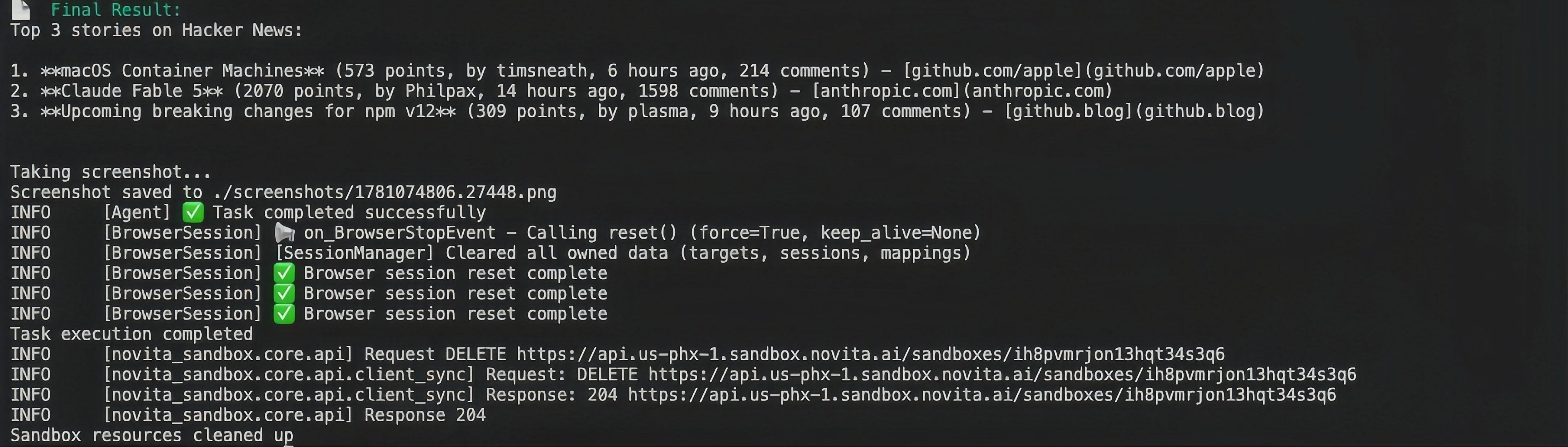
Nachdem Sie die Abhängigkeiten installiert und die Umgebungsvariablen eingerichtet haben, können Sie den Beispielcode ausführen. Wenn alles funktioniert, sehen Sie die Ausgabe wie unten im Terminal. Browser-use führt Aufgaben im Remote-Browser innerhalb Ihrer Sandbox aus.
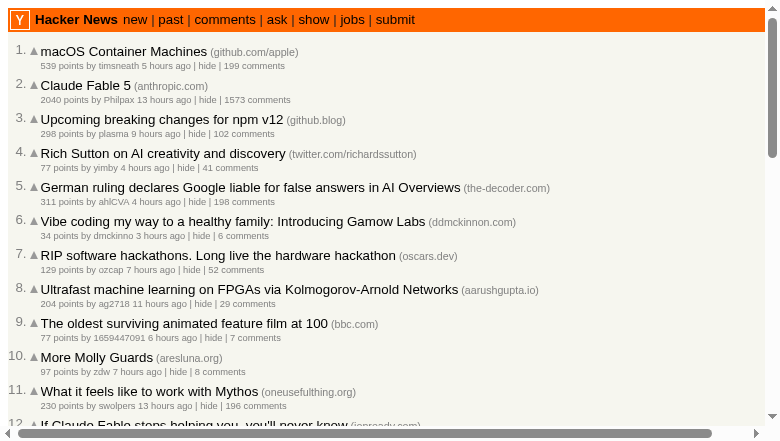
Es werden Screenshots wie unten erzeugt:
Um eine vollständigere Demo auszuführen, lesen Sie bitte [hier](https://github.com/novitalabs/Novita-CollabHub/tree/main/examples/browser-use).
 Es werden Screenshots wie unten erzeugt:
 Um eine vollständigere Demo auszuführen, lesen Sie bitte [hier](https://github.com/novitalabs/Novita-CollabHub/tree/main/examples/browser-use).