> ## Documentation Index
> Fetch the complete documentation index at: https://novita.ai/docs/llms.txt
> Use this file to discover all available pages before exploring further.
# MLflow
> Verfolgen Sie Novita-AI-Aufrufe in MLflow mit OpenAI-kompatibler SDK-Instrumentierung für Python und JavaScript.
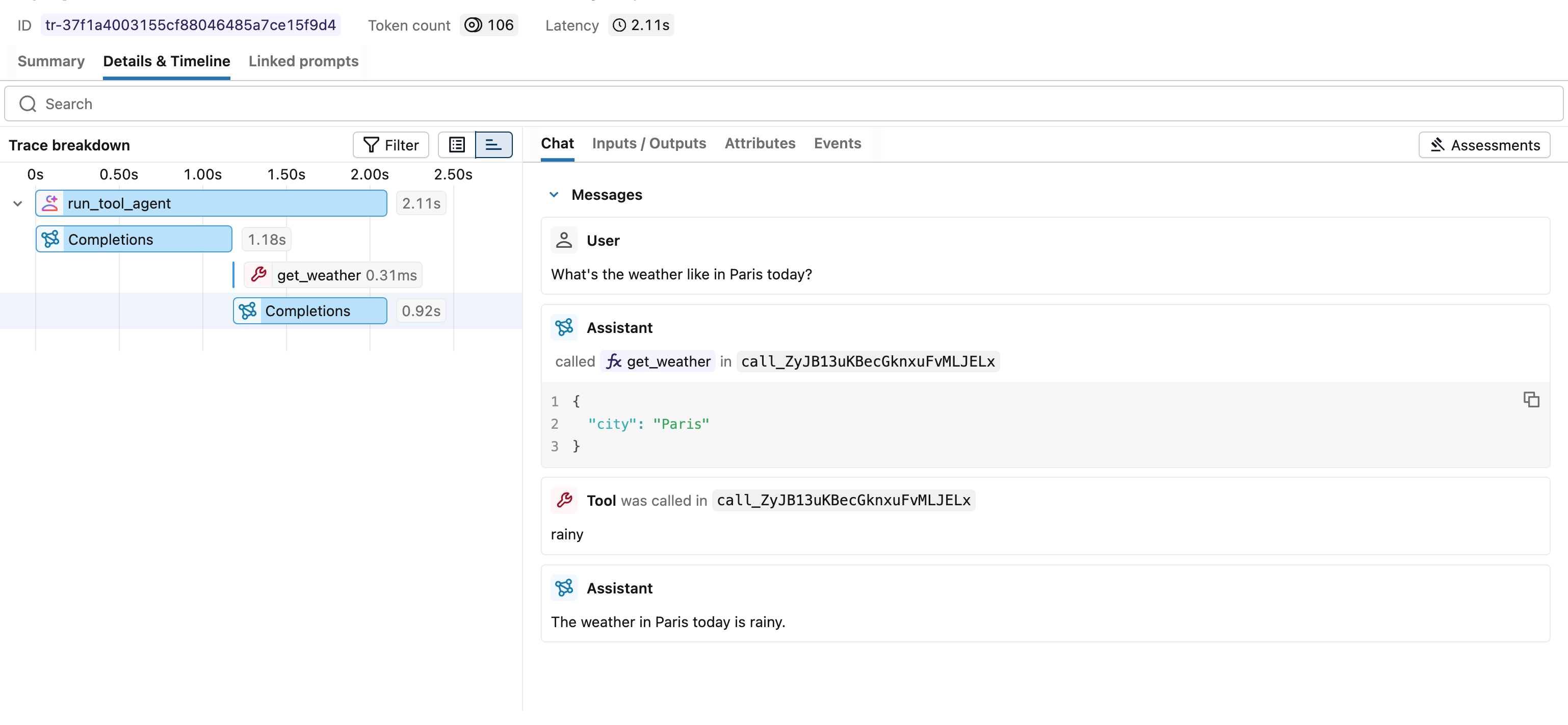
Diese Anleitung zeigt, wie Sie **Novita AI** mit MLflow Tracing integrieren. Durch die Verwendung des OpenAI-kompatiblen Endpunkts von Novita AI (`https://api.novita.ai/openai`) können Sie Prompts, Antworten, Latenz, Token-Nutzung und Modellmetadaten in MLflow erfassen.
 # Voraussetzungen
Bevor Sie beginnen, stellen Sie sicher, dass Sie Folgendes haben:
* Novita-AI-API-Schlüssel: Erstellen Sie einen in [Key Management](https://novita.ai/settings/key-management).
* Einen laufenden MLflow-Tracking-Server. Sie können den lokalen Standard `http://localhost:5000` verwenden.
* Python- oder JavaScript-Laufzeitumgebung.
# Integrationsschritte
## Schritt 1: Abhängigkeiten installieren
```bash Python icon="python" theme={"system"}
pip install 'mlflow[genai]' openai
```
```bash JavaScript / TypeScript icon="js" theme={"system"}
npm install @mlflow/openai openai
```
## Schritt 2: MLflow-Server starten
Wenn Sie eine lokale Python-Umgebung >= 3.10 haben, können Sie MLflow starten mit:
```bash theme={"system"}
mlflow server
```
MLflow stellt außerdem ein Docker-Compose-Setup bereit:
```bash theme={"system"}
git clone --depth 1 --filter=blob:none --sparse https://github.com/mlflow/mlflow.git
cd mlflow
git sparse-checkout set docker-compose
cd docker-compose
cp .env.dev.example .env
docker compose up -d
```
Öffnen Sie anschließend `http://localhost:5000`, um zu bestätigen, dass die MLflow-UI erreichbar ist.
## Schritt 3: Tracing aktivieren und Novita AI aufrufen
```python Python icon="python" theme={"system"}
import openai
import mlflow
# Enable auto-tracing for OpenAI-compatible calls
mlflow.openai.autolog()
# Optional: set tracking target and experiment
mlflow.set_tracking_uri("http://localhost:5000")
mlflow.set_experiment("Novita AI")
client = openai.OpenAI(
base_url="https://api.novita.ai/openai",
api_key="",
)
response = client.chat.completions.create(
model="deepseek/deepseek-r1",
messages=[
{"role": "system", "content": "You are a helpful assistant."},
{"role": "user", "content": "What is the capital of France?"},
],
)
print(response.choices[0].message.content)
```
```ts JavaScript / TypeScript icon="js" theme={"system"}
import { OpenAI } from "openai";
import { tracedOpenAI } from "@mlflow/openai";
const client = tracedOpenAI(
new OpenAI({
baseURL: "https://api.novita.ai/openai",
apiKey: "",
})
);
const response = await client.chat.completions.create({
model: "deepseek/deepseek-r1",
messages: [
{ role: "system", content: "You are a helpful assistant." },
{ role: "user", content: "What is the capital of France?" },
],
temperature: 0.1,
max_tokens: 100,
});
console.log(response.choices[0].message?.content);
```
## Schritt 4: Traces in der MLflow-UI anzeigen
Öffnen Sie Ihre MLflow-UI (zum Beispiel `http://localhost:5000`) und gehen Sie zu Ihrem konfigurierten Experiment, um Traces zu prüfen.
Sie sollten Folgendes sehen:
* Prompt- und Completion-Inhalte
* Latenz und Token-Nutzung
* Modell- und Anfrage-Metadaten
* Errors/exceptions (falls vorhanden)
## Schritt 5: Referenzen für erweitertes Tracing
### Streaming und Async
MLflow unterstützt Tracing für Streaming- und Async-Novita-AI-APIs. Siehe:
* [OpenAI Tracing](https://mlflow.org/docs/latest/genai/tracing/integrations/listing/openai/)
### Mit Frameworks oder manuellem Tracing kombinieren
```python Python icon="python" theme={"system"}
import json
from openai import OpenAI
import mlflow
from mlflow.entities import SpanType
# Initialize the OpenAI client with Novita AI API endpoint
client = OpenAI(
base_url="https://api.novita.ai/openai",
api_key="",
)
# Create a parent span for the Novita AI call
@mlflow.trace(span_type=SpanType.CHAIN)
def answer_question(question: str):
messages = [{"role": "user", "content": question}]
response = client.chat.completions.create(
model="deepseek/deepseek-r1",
messages=messages,
)
# Attach session/user metadata to the trace
mlflow.update_current_trace(
metadata={
"mlflow.trace.session": "session-12345",
"mlflow.trace.user": "user-a",
}
)
return response.choices[0].message.content
answer = answer_question("What is the capital of France?")
```
```ts JavaScript / TypeScript icon="js" theme={"system"}
import * as mlflow from "@mlflow/core";
import { OpenAI } from "openai";
import { tracedOpenAI } from "@mlflow/openai";
mlflow.init({
trackingUri: "http://localhost:5000",
experimentId: "",
});
// Wrap the OpenAI client and point to Novita AI endpoint
const client = tracedOpenAI(
new OpenAI({
baseURL: "https://api.novita.ai/openai",
apiKey: "",
})
);
// Create a traced function that wraps the Novita AI call
const answerQuestion = mlflow.trace(
async (question: string) => {
const resp = await client.chat.completions.create({
model: "deepseek/deepseek-r1",
messages: [{ role: "user", content: question }],
});
return resp.choices[0].message?.content;
},
{ name: "answer-question" }
);
await answerQuestion("What is the capital of France?");
```
Für die vollständige Upstream-Referenz:
* MLflow-Novita-AI-Integrationsseite: [Tracing Novita AI](https://mlflow.org/docs/latest/genai/tracing/integrations/listing/novitaai/)
* MLflow-OpenAI-Tracing-Dokumentation: [OpenAI Tracing](https://mlflow.org/docs/latest/genai/tracing/integrations/listing/openai/)
Weitere Informationen zu Novita-Modelldetails und Endpunktnutzung finden Sie hier:
* Novita LLM API-Leitfaden: [LLM API](/docs/de/guides/llm-api)
# Voraussetzungen
Bevor Sie beginnen, stellen Sie sicher, dass Sie Folgendes haben:
* Novita-AI-API-Schlüssel: Erstellen Sie einen in [Key Management](https://novita.ai/settings/key-management).
* Einen laufenden MLflow-Tracking-Server. Sie können den lokalen Standard `http://localhost:5000` verwenden.
* Python- oder JavaScript-Laufzeitumgebung.
# Integrationsschritte
## Schritt 1: Abhängigkeiten installieren
```bash Python icon="python" theme={"system"}
pip install 'mlflow[genai]' openai
```
```bash JavaScript / TypeScript icon="js" theme={"system"}
npm install @mlflow/openai openai
```
## Schritt 2: MLflow-Server starten
Wenn Sie eine lokale Python-Umgebung >= 3.10 haben, können Sie MLflow starten mit:
```bash theme={"system"}
mlflow server
```
MLflow stellt außerdem ein Docker-Compose-Setup bereit:
```bash theme={"system"}
git clone --depth 1 --filter=blob:none --sparse https://github.com/mlflow/mlflow.git
cd mlflow
git sparse-checkout set docker-compose
cd docker-compose
cp .env.dev.example .env
docker compose up -d
```
Öffnen Sie anschließend `http://localhost:5000`, um zu bestätigen, dass die MLflow-UI erreichbar ist.
## Schritt 3: Tracing aktivieren und Novita AI aufrufen
```python Python icon="python" theme={"system"}
import openai
import mlflow
# Enable auto-tracing for OpenAI-compatible calls
mlflow.openai.autolog()
# Optional: set tracking target and experiment
mlflow.set_tracking_uri("http://localhost:5000")
mlflow.set_experiment("Novita AI")
client = openai.OpenAI(
base_url="https://api.novita.ai/openai",
api_key="",
)
response = client.chat.completions.create(
model="deepseek/deepseek-r1",
messages=[
{"role": "system", "content": "You are a helpful assistant."},
{"role": "user", "content": "What is the capital of France?"},
],
)
print(response.choices[0].message.content)
```
```ts JavaScript / TypeScript icon="js" theme={"system"}
import { OpenAI } from "openai";
import { tracedOpenAI } from "@mlflow/openai";
const client = tracedOpenAI(
new OpenAI({
baseURL: "https://api.novita.ai/openai",
apiKey: "",
})
);
const response = await client.chat.completions.create({
model: "deepseek/deepseek-r1",
messages: [
{ role: "system", content: "You are a helpful assistant." },
{ role: "user", content: "What is the capital of France?" },
],
temperature: 0.1,
max_tokens: 100,
});
console.log(response.choices[0].message?.content);
```
## Schritt 4: Traces in der MLflow-UI anzeigen
Öffnen Sie Ihre MLflow-UI (zum Beispiel `http://localhost:5000`) und gehen Sie zu Ihrem konfigurierten Experiment, um Traces zu prüfen.
Sie sollten Folgendes sehen:
* Prompt- und Completion-Inhalte
* Latenz und Token-Nutzung
* Modell- und Anfrage-Metadaten
* Errors/exceptions (falls vorhanden)
## Schritt 5: Referenzen für erweitertes Tracing
### Streaming und Async
MLflow unterstützt Tracing für Streaming- und Async-Novita-AI-APIs. Siehe:
* [OpenAI Tracing](https://mlflow.org/docs/latest/genai/tracing/integrations/listing/openai/)
### Mit Frameworks oder manuellem Tracing kombinieren
```python Python icon="python" theme={"system"}
import json
from openai import OpenAI
import mlflow
from mlflow.entities import SpanType
# Initialize the OpenAI client with Novita AI API endpoint
client = OpenAI(
base_url="https://api.novita.ai/openai",
api_key="",
)
# Create a parent span for the Novita AI call
@mlflow.trace(span_type=SpanType.CHAIN)
def answer_question(question: str):
messages = [{"role": "user", "content": question}]
response = client.chat.completions.create(
model="deepseek/deepseek-r1",
messages=messages,
)
# Attach session/user metadata to the trace
mlflow.update_current_trace(
metadata={
"mlflow.trace.session": "session-12345",
"mlflow.trace.user": "user-a",
}
)
return response.choices[0].message.content
answer = answer_question("What is the capital of France?")
```
```ts JavaScript / TypeScript icon="js" theme={"system"}
import * as mlflow from "@mlflow/core";
import { OpenAI } from "openai";
import { tracedOpenAI } from "@mlflow/openai";
mlflow.init({
trackingUri: "http://localhost:5000",
experimentId: "",
});
// Wrap the OpenAI client and point to Novita AI endpoint
const client = tracedOpenAI(
new OpenAI({
baseURL: "https://api.novita.ai/openai",
apiKey: "",
})
);
// Create a traced function that wraps the Novita AI call
const answerQuestion = mlflow.trace(
async (question: string) => {
const resp = await client.chat.completions.create({
model: "deepseek/deepseek-r1",
messages: [{ role: "user", content: question }],
});
return resp.choices[0].message?.content;
},
{ name: "answer-question" }
);
await answerQuestion("What is the capital of France?");
```
Für die vollständige Upstream-Referenz:
* MLflow-Novita-AI-Integrationsseite: [Tracing Novita AI](https://mlflow.org/docs/latest/genai/tracing/integrations/listing/novitaai/)
* MLflow-OpenAI-Tracing-Dokumentation: [OpenAI Tracing](https://mlflow.org/docs/latest/genai/tracing/integrations/listing/openai/)
Weitere Informationen zu Novita-Modelldetails und Endpunktnutzung finden Sie hier:
* Novita LLM API-Leitfaden: [LLM API](/docs/de/guides/llm-api)