> ## Documentation Index
> Fetch the complete documentation index at: https://novita.ai/docs/llms.txt
> Use this file to discover all available pages before exploring further.
# DeepSeek-OCR-Nutzung
## Überblick
DeepSeek-OCR ist für Dokumenterkennung und Bild-zu-Text-Szenarien konzipiert und erweitert die Grenzen der visuellen und textuellen Komprimierung. Das Modell kann lange Texte in hochkomprimierte Bilder umwandeln und erreicht dabei eine OCR-Genauigkeit von 97 % bei einem verlustfreien Komprimierungsverhältnis von 10x sowie etwa 60 % Genauigkeit bei 20x Komprimierung.
Dieses Modell unterstützt derzeit nur unabhängige Erkennungsaufgaben mit einer einzelnen Anfrage. Mehrstufige Konversationen werden nicht unterstützt. Pro Anfrage kann nur ein Bild hochgeladen werden, und es wird dringend empfohlen, voreingestellte Prompts für optimale Leistung zu verwenden.
## Empfohlene voreingestellte Prompts
```bash theme={"system"}
# Convert the document contents to markdown format
<|grounding|>Convert the document to markdown.
# Perform text recognition on this image
<|grounding|>OCR this image.
# Extract all text without layout consideration
Free OCR.
# Parse any figures or tables in the document
Parse the figure.
# Provide a detailed description of the image content
Describe this image in detail.
# Locate the position of <|ref|>xxxx<|/ref|> in the image
Locate <|ref|>xxxx<|/ref|> in the image.
```
## Nutzungsbeispiel
Dieses Beispiel verwendet den voreingestellten Prompt `<|grounding|>OCR this image.`, um Texterkennung in Bildern durchzuführen.
```python theme={"system"}
from openai import OpenAI
client = OpenAI(
base_url="https://api.novita.ai/openai",
api_key="",
)
response = client.chat.completions.create(
model="deepseek/deepseek-ocr",
messages=[
{
"role": "user",
"content": [
{
"type": "image_url",
"image_url": {
"url": "https://example.com/image.png"
}
},
{
"type": "text",
"text": "<|grounding|>OCR this image."
}
]
}
],
stream=False,
max_tokens=4096
)
content = response.choices[0].message.content
print(content)
```
Beispiel-Eingabebild:
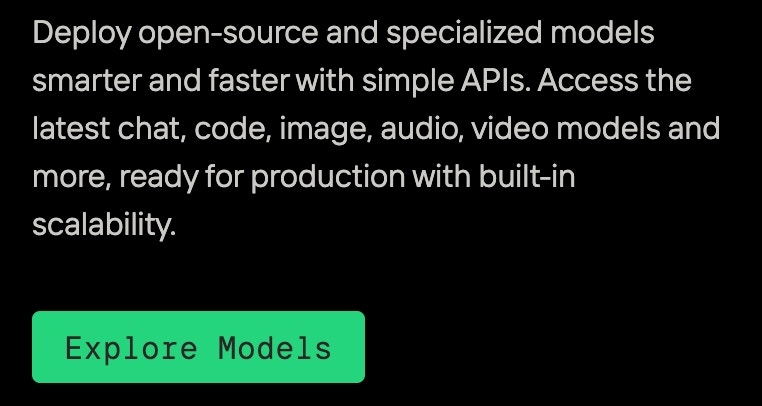 Beispielausgabe:
```
<|/ref|><|det|>[[37, 48, 279, 140]]<|/det|>
<|ref|>Deploy open-source and specialized models<|/ref|><|det|>[[42, 48, 857, 133]]<|/det|>
<|ref|>smarterandfasterwithsimpleApls.Accessthe<|/ref|><|det|>[[44, 185, 902, 246]]<|/det|>
<|ref|>latest chat, code, image, audio, video models and<|/ref|><|det|>[[41, 291, 945, 370]]<|/det|>
<|ref|>more,ready for production with built-in<|/ref|><|det|>[[40, 407, 756, 488]]<|/det|>
<|ref|>scalability.<|/ref|><|det|>[[39, 515, 232, 606]]<|/det|>
<|ref|>Explore<|/ref|><|det|>[[87, 813, 266, 879]]<|/det|>
<|ref|>Models<|/ref|><|det|>[[289, 816, 432, 878]]<|/det|>
```
Beispielausgabe:
```
<|/ref|><|det|>[[37, 48, 279, 140]]<|/det|>
<|ref|>Deploy open-source and specialized models<|/ref|><|det|>[[42, 48, 857, 133]]<|/det|>
<|ref|>smarterandfasterwithsimpleApls.Accessthe<|/ref|><|det|>[[44, 185, 902, 246]]<|/det|>
<|ref|>latest chat, code, image, audio, video models and<|/ref|><|det|>[[41, 291, 945, 370]]<|/det|>
<|ref|>more,ready for production with built-in<|/ref|><|det|>[[40, 407, 756, 488]]<|/det|>
<|ref|>scalability.<|/ref|><|det|>[[39, 515, 232, 606]]<|/det|>
<|ref|>Explore<|/ref|><|det|>[[87, 813, 266, 879]]<|/det|>
<|ref|>Models<|/ref|><|det|>[[289, 816, 432, 878]]<|/det|>
```