> ## Documentation Index
> Fetch the complete documentation index at: https://novita.ai/docs/llms.txt
> Use this file to discover all available pages before exploring further.
# Langfuse
> Schritt-für-Schritt-Anleitung zur Einrichtung von Langfuse mit Novita AI, um KI-Anwendungen zu entwickeln, zu überwachen, zu evaluieren und zu debuggen.
Mit Langfuse kann Ihr Team gemeinsam LLM-Anwendungen debuggen, analysieren und iterieren, die mit Novita AI erstellt wurden. Die vollständig integrierten Funktionen optimieren den Entwicklungsworkflow, steigern die Effizienz und beschleunigen den Fortschritt.
Diese Anleitung zeigt Ihnen, wie Sie Novita AI mit Langfuse integrieren. Die API-Endpunkte von Novita AI für Chat, Sprache und Code sind vollständig mit der API von OpenAI kompatibel. Dadurch können wir das Langfuse OpenAI-Drop-in-Replacement verwenden, um alle Teile Ihrer Anwendung zu tracen.
# Voraussetzungen
Bevor Sie beginnen, stellen Sie sicher, dass Sie Folgendes haben:
* Novita AI LLM API Key:
* Besuchen Sie die Website von Novita AI, um ein Konto zu erstellen.
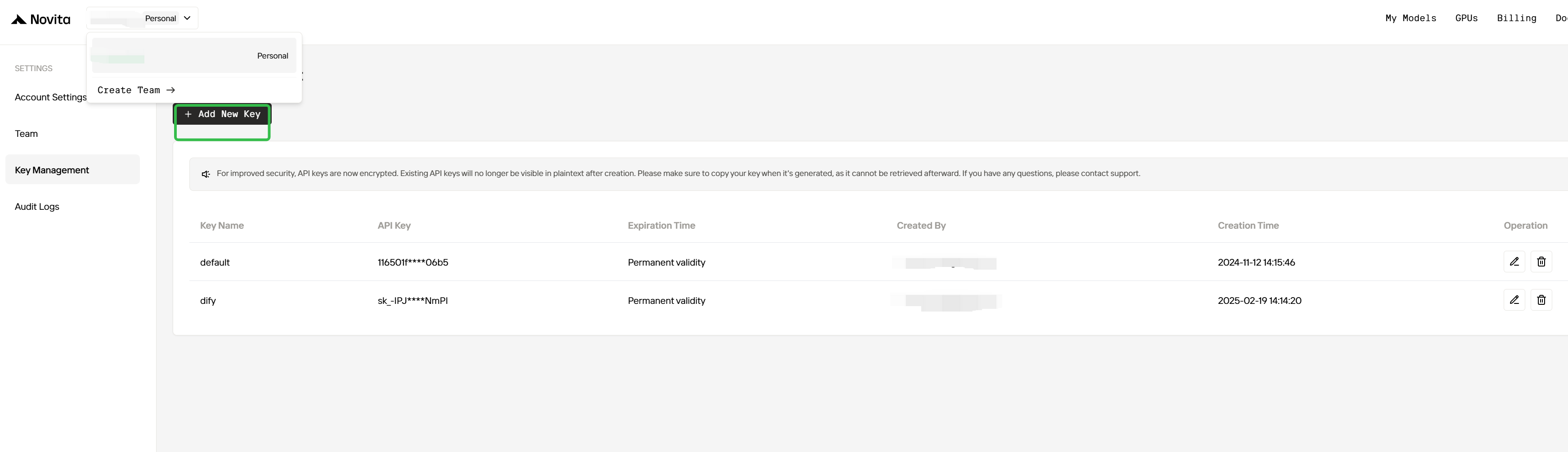
* Melden Sie sich an und gehen Sie zur Seite Key Management, um Ihren API Key zu generieren, der für die Integration der Modelle von Novita AI mit Langfuse erforderlich ist.
 * Langfuse-Konto:
* Registrieren Sie sich auf der offiziellen [Langfuse](https://langfuse.com)-Website für ein Langfuse-Konto, um mit der Entwicklung leistungsstarker KI-Anwendungen zu beginnen.
# Integrationsschritte
## Schritt 1: Abhängigkeiten installieren
Stellen Sie sicher, dass Sie alle erforderlichen Python-Pakete installiert haben:
```shell theme={"system"}
pip install openai langfuse
```
## Schritt 2: Umgebungsvariablen einrichten
```python theme={"system"}
import os
# Get keys for your project from the project settings page
# https://cloud.langfuse.com
os.environ["LANGFUSE_PUBLIC_KEY"] = "pk-..." # DOCS EXAMPLE KEYS
os.environ["LANGFUSE_SECRET_KEY"] = "sk-..." # DOCS EXAMPLE KEYS
os.environ["LANGFUSE_HOST"] = "https://cloud.langfuse.com" # 🇪🇺 EU region
# os.environ["LANGFUSE_HOST"] = "https://us.cloud.langfuse.com" # 🇺🇸 US region
# Get your Novita AI API key from the project settings page
os.environ["NOVITA_API_KEY"] = "..."
```
## Schritt 3: Langfuse OpenAI-Drop-in-Replacement
In diesem Schritt verwenden wir das native [OpenAI-Drop-in-Replacement](https://langfuse.com/docs/integrations/openai/python/get-started), indem wir `from langfuse.openai import openai` importieren.
Um Novita AI mit den Client-Bibliotheken von OpenAI zu verwenden, übergeben Sie Ihren Novita AI API Key an die Option `api_key` und ändern Sie `base_url` in [`https://api.novita.ai/openai:`](https://api.novita.ai/openai)
```python theme={"system"}
# instead of import openai:
from langfuse.openai import openai
client = openai.OpenAI(
api_key=os.environ.get("NOVITA_API_KEY"),
base_url="https://api.novita.ai/openai",
)
```
**Hinweis:** Das OpenAI-Drop-in-Replacement ist vollständig kompatibel mit dem [Langfuse Python SDK](https://langfuse.com/docs/observability/sdk/overview) und der [`@observe()` instrumentation](https://langfuse.com/docs/observability/sdk/instrumentation), um alle Teile Ihrer Anwendung zu tracen.
## Schritt 4: Ein Beispiel ausführen
Die folgende Codezelle zeigt, wie Sie den getracten OpenAI-Client verwenden, um das Chat-Modell von Novita AI aufzurufen. Alle API-Aufrufe werden nahtlos von Langfuse getract.
```python theme={"system"}
client = openai.OpenAI(
api_key=os.environ.get("NOVITA_API_KEY"),
base_url="https://api.novita.ai/openai",
)
response = client.chat.completions.create(
model="meta-llama/llama-3.1-70b-instruct",
messages=[
{"role": "system", "content": "Act like you are a helpful assistant."},
{"role": "user", "content": "What are the famous attractions in San Francisco?"},
]
)
print(response.choices[0].message.content)
San Francisco, one of the most iconic cities in the world, is home to a plethora of famous attractions that cater to all interests and ages. Here are some of the most popular attractions in San Francisco:
1. **Golden Gate Bridge**: An engineering marvel and a symbol of San Francisco, the Golden Gate Bridge is a must-visit attraction. Take a walk or bike ride across the bridge for spectacular views of the city and the Bay.
2. **Alcatraz Island**: Explore the infamous former prison turned national park, which once housed notorious inmates like Al Capone. Take a ferry to the island and enjoy a guided tour of the prison and its surroundings.
3. **Fisherman's Wharf**: A bustling waterfront district, Fisherman's Wharf is famous for its seafood restaurants, street performers, and stunning views of the Bay Bridge and Alcatraz Island. Don't miss the sea lions at Pier 39!
4. **Chinatown**: San Francisco's Chinatown is one of the largest and oldest in the United States. Explore the colorful streets, try some authentic Chinese cuisine, and shop for unique souvenirs.
5. **Golden Gate Park**: A sprawling urban park that's home to several attractions, including the de Young Museum, the California Academy of Sciences, and the Japanese Tea Garden.
6. **Cable Cars**: A classic San Francisco experience, the cable cars offer a fun and historic way to explore the city. Take a ride on the Powell-Mason line to Fisherman's Wharf, or the Powell-Hyde line to Lombard Street.
7. **Lombard Street**: Known as the "crookedest street in the world," Lombard Street is a scenic and winding road that offers stunning views of the city.
8. **Union Square**: A vibrant public square in the heart of the city, Union Square is surrounded by shopping, dining, and entertainment options. Catch a show at the historic Curran Theatre or take a stroll through the square.
9. **The Painted Ladies**: A row of colorful Victorian houses on Alamo Square, the Painted Ladies are a iconic symbol of San Francisco's architecture. Take a photo in front of these stunning homes.
10. **The Exploratorium**: A museum of science, art, and human perception, the Exploratorium is a great place to learn and have fun. With interactive exhibits and stunning views of the Bay, it's a must-visit for families and science enthusiasts.
11. **Pier 39**: A popular shopping and dining destination, Pier 39 offers stunning views of the Bay Bridge, Alcatraz Island, and the sea lions that call the pier home.
12. **The de Young Museum**: A fine arts museum located in Golden Gate Park, the de Young Museum features a diverse collection of art and cultural exhibitions from around the world.
These are just a few of the many famous attractions in San Francisco. Whether you're interested in history, culture, science, or entertainment, San Francisco has something for everyone.
```
## Schritt 5: Traces in Langfuse ansehen
Nachdem Sie den Beispiel-Modellaufruf ausgeführt haben, können Sie die Traces in Langfuse ansehen. Diese Traces liefern detaillierte Informationen zu Ihren Novita AI API-Aufrufen, darunter:
* Anfrageparameter (model, messages, temperature usw.)
* Antwortinhalt
* Token-Nutzungsstatistiken
* Latenzmetriken
[Öffentlicher Beispiel-Trace-Link in Langfuse](https://cloud.langfuse.com/project/cm7ua5l6e05wlad07qr6ce2wn/traces/039cc8b2-dba0-479f-9cd6-63672bc08c71?timestamp=2025-03-06T02%3A15%3A15.184Z).
* Langfuse-Konto:
* Registrieren Sie sich auf der offiziellen [Langfuse](https://langfuse.com)-Website für ein Langfuse-Konto, um mit der Entwicklung leistungsstarker KI-Anwendungen zu beginnen.
# Integrationsschritte
## Schritt 1: Abhängigkeiten installieren
Stellen Sie sicher, dass Sie alle erforderlichen Python-Pakete installiert haben:
```shell theme={"system"}
pip install openai langfuse
```
## Schritt 2: Umgebungsvariablen einrichten
```python theme={"system"}
import os
# Get keys for your project from the project settings page
# https://cloud.langfuse.com
os.environ["LANGFUSE_PUBLIC_KEY"] = "pk-..." # DOCS EXAMPLE KEYS
os.environ["LANGFUSE_SECRET_KEY"] = "sk-..." # DOCS EXAMPLE KEYS
os.environ["LANGFUSE_HOST"] = "https://cloud.langfuse.com" # 🇪🇺 EU region
# os.environ["LANGFUSE_HOST"] = "https://us.cloud.langfuse.com" # 🇺🇸 US region
# Get your Novita AI API key from the project settings page
os.environ["NOVITA_API_KEY"] = "..."
```
## Schritt 3: Langfuse OpenAI-Drop-in-Replacement
In diesem Schritt verwenden wir das native [OpenAI-Drop-in-Replacement](https://langfuse.com/docs/integrations/openai/python/get-started), indem wir `from langfuse.openai import openai` importieren.
Um Novita AI mit den Client-Bibliotheken von OpenAI zu verwenden, übergeben Sie Ihren Novita AI API Key an die Option `api_key` und ändern Sie `base_url` in [`https://api.novita.ai/openai:`](https://api.novita.ai/openai)
```python theme={"system"}
# instead of import openai:
from langfuse.openai import openai
client = openai.OpenAI(
api_key=os.environ.get("NOVITA_API_KEY"),
base_url="https://api.novita.ai/openai",
)
```
**Hinweis:** Das OpenAI-Drop-in-Replacement ist vollständig kompatibel mit dem [Langfuse Python SDK](https://langfuse.com/docs/observability/sdk/overview) und der [`@observe()` instrumentation](https://langfuse.com/docs/observability/sdk/instrumentation), um alle Teile Ihrer Anwendung zu tracen.
## Schritt 4: Ein Beispiel ausführen
Die folgende Codezelle zeigt, wie Sie den getracten OpenAI-Client verwenden, um das Chat-Modell von Novita AI aufzurufen. Alle API-Aufrufe werden nahtlos von Langfuse getract.
```python theme={"system"}
client = openai.OpenAI(
api_key=os.environ.get("NOVITA_API_KEY"),
base_url="https://api.novita.ai/openai",
)
response = client.chat.completions.create(
model="meta-llama/llama-3.1-70b-instruct",
messages=[
{"role": "system", "content": "Act like you are a helpful assistant."},
{"role": "user", "content": "What are the famous attractions in San Francisco?"},
]
)
print(response.choices[0].message.content)
San Francisco, one of the most iconic cities in the world, is home to a plethora of famous attractions that cater to all interests and ages. Here are some of the most popular attractions in San Francisco:
1. **Golden Gate Bridge**: An engineering marvel and a symbol of San Francisco, the Golden Gate Bridge is a must-visit attraction. Take a walk or bike ride across the bridge for spectacular views of the city and the Bay.
2. **Alcatraz Island**: Explore the infamous former prison turned national park, which once housed notorious inmates like Al Capone. Take a ferry to the island and enjoy a guided tour of the prison and its surroundings.
3. **Fisherman's Wharf**: A bustling waterfront district, Fisherman's Wharf is famous for its seafood restaurants, street performers, and stunning views of the Bay Bridge and Alcatraz Island. Don't miss the sea lions at Pier 39!
4. **Chinatown**: San Francisco's Chinatown is one of the largest and oldest in the United States. Explore the colorful streets, try some authentic Chinese cuisine, and shop for unique souvenirs.
5. **Golden Gate Park**: A sprawling urban park that's home to several attractions, including the de Young Museum, the California Academy of Sciences, and the Japanese Tea Garden.
6. **Cable Cars**: A classic San Francisco experience, the cable cars offer a fun and historic way to explore the city. Take a ride on the Powell-Mason line to Fisherman's Wharf, or the Powell-Hyde line to Lombard Street.
7. **Lombard Street**: Known as the "crookedest street in the world," Lombard Street is a scenic and winding road that offers stunning views of the city.
8. **Union Square**: A vibrant public square in the heart of the city, Union Square is surrounded by shopping, dining, and entertainment options. Catch a show at the historic Curran Theatre or take a stroll through the square.
9. **The Painted Ladies**: A row of colorful Victorian houses on Alamo Square, the Painted Ladies are a iconic symbol of San Francisco's architecture. Take a photo in front of these stunning homes.
10. **The Exploratorium**: A museum of science, art, and human perception, the Exploratorium is a great place to learn and have fun. With interactive exhibits and stunning views of the Bay, it's a must-visit for families and science enthusiasts.
11. **Pier 39**: A popular shopping and dining destination, Pier 39 offers stunning views of the Bay Bridge, Alcatraz Island, and the sea lions that call the pier home.
12. **The de Young Museum**: A fine arts museum located in Golden Gate Park, the de Young Museum features a diverse collection of art and cultural exhibitions from around the world.
These are just a few of the many famous attractions in San Francisco. Whether you're interested in history, culture, science, or entertainment, San Francisco has something for everyone.
```
## Schritt 5: Traces in Langfuse ansehen
Nachdem Sie den Beispiel-Modellaufruf ausgeführt haben, können Sie die Traces in Langfuse ansehen. Diese Traces liefern detaillierte Informationen zu Ihren Novita AI API-Aufrufen, darunter:
* Anfrageparameter (model, messages, temperature usw.)
* Antwortinhalt
* Token-Nutzungsstatistiken
* Latenzmetriken
[Öffentlicher Beispiel-Trace-Link in Langfuse](https://cloud.langfuse.com/project/cm7ua5l6e05wlad07qr6ce2wn/traces/039cc8b2-dba0-479f-9cd6-63672bc08c71?timestamp=2025-03-06T02%3A15%3A15.184Z).